Adventures in 3D Design: FreeCAD

3D printing is key to an abundant world.

We use a lot of stuff. And until now, the most efficient way for the most people to have the most stuff has been to specialize — big, centralized factories custom-tooled to build a whole bunch of whatever (potato chips, cars, iPhones, toilet paper) and ship it around the world. Of course there’s localized capacity too, but only  where the scale is enough to support the cost of a new big custom-tooled factory.

Viewed from a distance, it’s kind of crazy — so much physical stuff (input materials, sub-components, final goods) moving so many places! The overhead of extraction, custom fabrication, packaging and transport is staggering. But especially in an environment where we don’t factor in costs to the, you know, environment — it pencils out.

3D printing is qualitatively different: hyper-local “factories” that create all the stuff using the same simple input materials. Now of course that’s a bold statement; today’s 3D printing ecosystem can’t live up to that hype. But it will, and sooner than we think, for sure.

Models make the magic happen

Even in today’s limited form, 3D printers are remarkably capable. Sites like Thingiverse and Printables contain thousands of pre-built models for everything: toys, replacement parts, containers, tools, housewares, even weapons … it’s kind of overwhelming.

These models are the currency of the 3D printing world. It’s clear that CAD expertise — the ability to create 3D models for printing — is becoming just as valuable in the physical world as coding skills have been in the software world. Something that everybody should know a little bit about, even if it’s not part of your everyday.

Side note: AI is beginning to eat CAD the same way it’s eating code — for example, Claude built me this printable rubber-band gun with just a quick prompt and a couple of corrections. This is cool, but doesn’t change anything; it’s still worth learning the fundamentals. It’ll make you a better future manager of AI designers.

So come along as I learn to build a model using FreeCAD. This is my first attempt, and my “teacher” is mostly YouTube — so don’t expect the Venus de Milo. And this isn’t a tutorial, there are already a ton of those. It’s more an exploration of how to break down objects and their about their design.

A phone holder for the Rivian console

OK — our topic for today is my super-awesome Rivian R1S and its less-awesome center console.  Most public ire is directed at the console’s black hole of a storage compartment, one of the least usable spaces I’ve ever seen. The 3D world has already gone to town on this, creating a ton of stacking units that cover up the embarrassment. Lara bought one within days of getting the car.

My issue is more subtle. The Rivian display is great, but I still like to have my phone visible “at a glance” while I drive. This is especially important given the NSA-level monitoring of my eyes during hands-free driving. A phone on the center console tray lies flat which sucks. There are a bunch of great dash mount options, but there’s no power up there — I hate threading cables all over the car.

What to do? Well it turns out there is this weird niche in the front of the console that seems primarily designed to capture pens and make them hard to retrieve. It struck me that one could build a piece that inserts into this niche and holds the phone at a reasonable angle.

This felt like the perfect thing to create as a vehicle to learn how to use FreeCAD — a complex shape with some interesting requirements, but no moving parts and possible to print in one piece. Challenge accepted!

Spoiler Alert

I’d love to save the reveal for the end, but you kind of need to see where we’re heading for anything else to make sense. So here is the final product — in the car, and as a rotatable model you can spin around. Pretty simple, the bulk of the piece nestles securely in the console niche and provides a base for the plate and hook the phone goes into. It actually works phenomenally — woo hoo!

Getting started with FreeCAD
There are a bunch of really capable free CAD programs out there; I chose FreeCAD because it seems to be the most “professional” system — I was looking for something that would force me to learn the fundamentals.

It’s an amazing application — and bewildering on first run! My usual mode is to just wade in, but there was just no way. So I spent some time watching this phenomenal set of tutorials (note they do show an older version of the app) and bought an actual paper reference book (which made me feel very nostalgic for my Richter and O’Reilly days).

OK, start again. There are really just a few key concepts to understand; the rest is (a metric ton of) specialized tools and controls for manipulating the basics.

Bodies and Sketches

FreeCAD is a parametric design tool, which means it builds up objects based on geometric shapes and relationships / constraints between them. This is a bit less intuitive than direct design, which is more about manipulating objects with push, pull and rotate operations, kind of like sculpting a block of clay. I’m no expert; it seems to be one of those religious things. Anyhoo…

The first “big idea” is that objects are built up from 2D “sketches” — line drawings created on a plane in 3D space. These sketches serve as the basis of actual objects, with various other operations adding the third dimension.

Job 1: define the base piece that sits inside the niche. It’s a pretty weird shape: a flat side at the back, curved at the front, growing larger from bottom to top. FreeCAD lets you import an image to use as reference, so I started by taking a picture from the top with a ruler sitting next to it. The ruler lets us calibrate measurements by specifying something of known size (i.e., the ticks).

This gives us something to trace with sketching tools. The first sketch was for the bottom of the niche, so I created it on the XY plane (remember we are looking straight down from the top).

Next I needed a sketch for the top of the niche. This gets interesting — I’m still looking straight down so this second sketch is also on the XY plane. But it’s separated from the bottom by a height — that is, it needs to be at a different place on the Z axis. I did this by adding a second XY sketch but offsetting its position by 30mm. This is key and very powerful: the plane of a sketch is always flat, but can be moved and rotated anywhere in 3D space.

Here’s how the two sketches look together:

Constraints

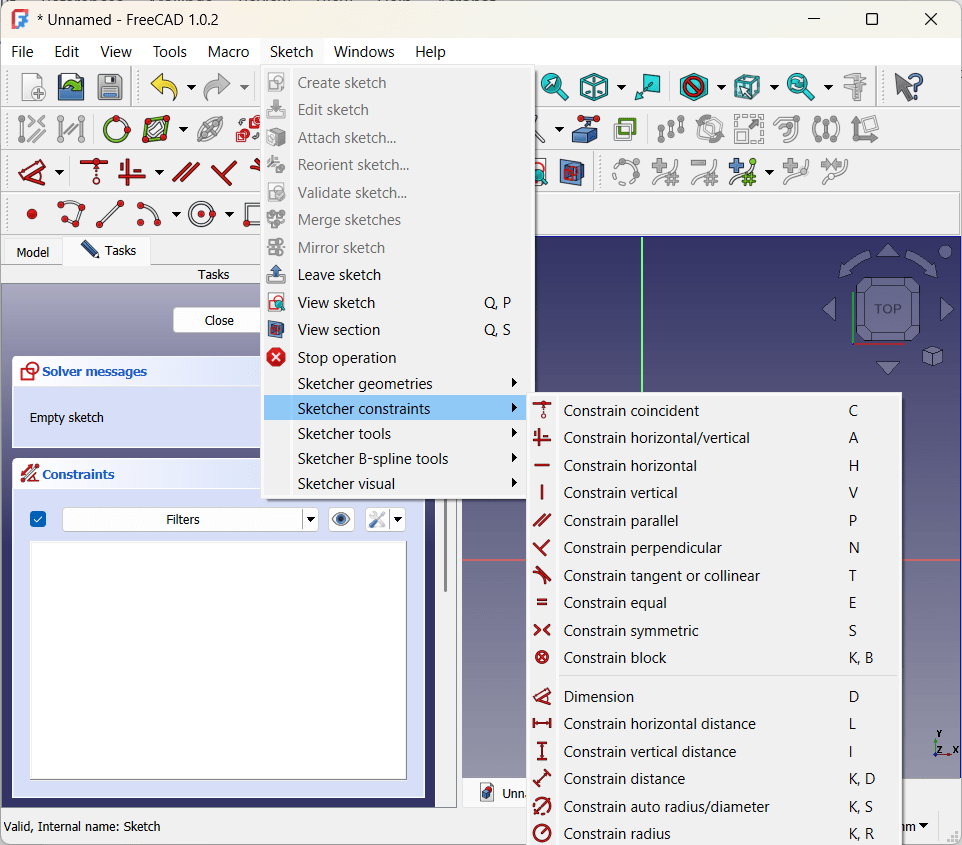
“Constraints” enforce structural integrity by defining relationships between parts of a sketch. For example, a line might be constrained to a certain length or to always stay parallel to the X axis. Two points might be held symmetrical across an axis, or kept a certain distance apart from each other. The radius of an arc can be held constant, or lines can be made tangent to each other (nice for smooth transitions).

Typical best practice is to “fully constrain” sketches — defining enough relationships that the sketches stay exactly as they are on the plane. This isn’t a hard requirement, and there is a tinge of religion to conversations about it online, but I found it super-useful simply as a way to make sure I understand how the sketch fits together. In particular, symmetry constraints really helped ensure that the b-spline curves matched up on either side of the Y axis.

Adding volume: lofts, pads, rotations

Once you have sketches that define a planar view of your objects, you create volume by extending them into the third dimension. For the niche I used a “loft” operation to smoothly connect the bottom and the top:

Side note: at this point I got really excited and ran a test print to see how it fit into the niche. Unfortunately the answer was “not super-great” — tracing the image was a good start, especially for the curved sections, but I needed to tweak things a few times before getting it right. We got there eventually, but I’ll be using a more measurement-based approach for future projects.

There are lots of these operations. For a piece that is consistent in the third dimension (for example, a rectangular box), the “pad” operation simply adds thickness to a sketch:

Yet another option is “rotation” which spins a sketch around an axis:

This variety is the biggest reason that, at least for me, YouTube was a huge part of learning FreeCAD. It’s super-helpful to just watch people building things — which tools and constraints they choose and how it all fits together.

Adding the Mount Plate (Datum Planes)

Next up was the tilted plate for the phone to lay against. This is another place where things get interesting — the plate needed to lay at about a 40 degree angle for best viewing — but sketches sit parallel to the XY, XZ or YZ axes.

The tool for this is the “datum plane,” which essentially creates a new local XYZ coordinate system based off of objects in the original one. By creating a datum plane along the back vertical face of the niche insert and rotating it 50 degrees backwards, I ended up with exactly the right surface for a sketch.

You can see that the sketch is actually embedded inside the niche insert. Combining this with a “tapered” pad operation gave me more surface area connecting the plate to the insert for strength.

The Hook

Originally my plan was to extend a 17mm ball mount straight out from the plate, and attach a store-bought universal holder to that. But as I saw the piece come together, that seemed overly complicated — I could just create a little shelf and, by adding a couple hidden strips of grip tape, my phone would sit just fine.

One last sketch and pad did the trick — the only additional interesting thing here is that I used a “symmetric” pad to extend it evenly on either side of the sketch (shown in white). Not critical, just made it easier to ensure it was centered.

Finishing Touches (Fillets and Chamfers)

When you buy doodads like this, the edges are always smoothed out — both for aesthetic reasons and because sharp edges are pointy and uncomfortable. I do the same in woodworking too, I just never thought about it much. But apparently these operations are so fundamental to 3D design, they get their own dedicated tools!

I used a mix of chamfers (just cutting off the edge) and fillets (a rounded profile) for various parts of the piece. Done and dusted!

“Buildability”

Wait, one more thing. You may recall a million years ago when I first got my printer, I wrote about support for overhanging areas. The obvious way to print the phone holder is with the flat insert side on the printing plate to minimize overhang. This was fine, except my first attempt at the “hook” extended just a few millimeters past that edge.

Keeping it this way would have required a ton of stupid, wasteful support structure — so I went back and tweaked things a bit so the hook sat a bit higher on the plate. Easy peasy, but a great reminder that the end user is not the only source of requirements — “buildability” is important as well.

It’s actually been awhile since I’ve learned so much in such a concentrated way. I’m really glad I did it, and I’m already thinking about my next project. One that involves multiple moving parts and joints — hinges, snaps, axles, that kind of thing. Wish me luck!

Coda

This piece works great for me — I love the low profile and ease of dropping the phone onto the plate. But it was eating at me a bit that it wasn’t very universal — my beloved Razr is 9mm thick and I never use a case, so the hook is too narrow for many phones. I could make it bigger, but too big and the phone starts slopping around. So I went back and built the version with a ball mount too, and keep it in the car in case Lara wants to put her (sigh) iPhone or whatever in there.

If you’ve got a Rivian and would like to print or adapt a holder yourself, please feel free to download and use the files below however you’d like. No guarantees that I did anything the right way though … you’re on your own!

Rivian v Tesla (I’m a Mac, and I’m a PC)

Update 8/12: We just got the car back from the Bellevue Rivian service center and it does appear that the car had a problem with the cooling system (the infamous 5-way valve others have posted about, e.g., here). Service took way too long — they’re clearly struggling with the logistics of scale-up — but they got me a reasonable loaner and (I think) found the root cause. Hopefully we’ll have a smoother fast charging experience when we head back to California in a couple of months. Woo hoo!

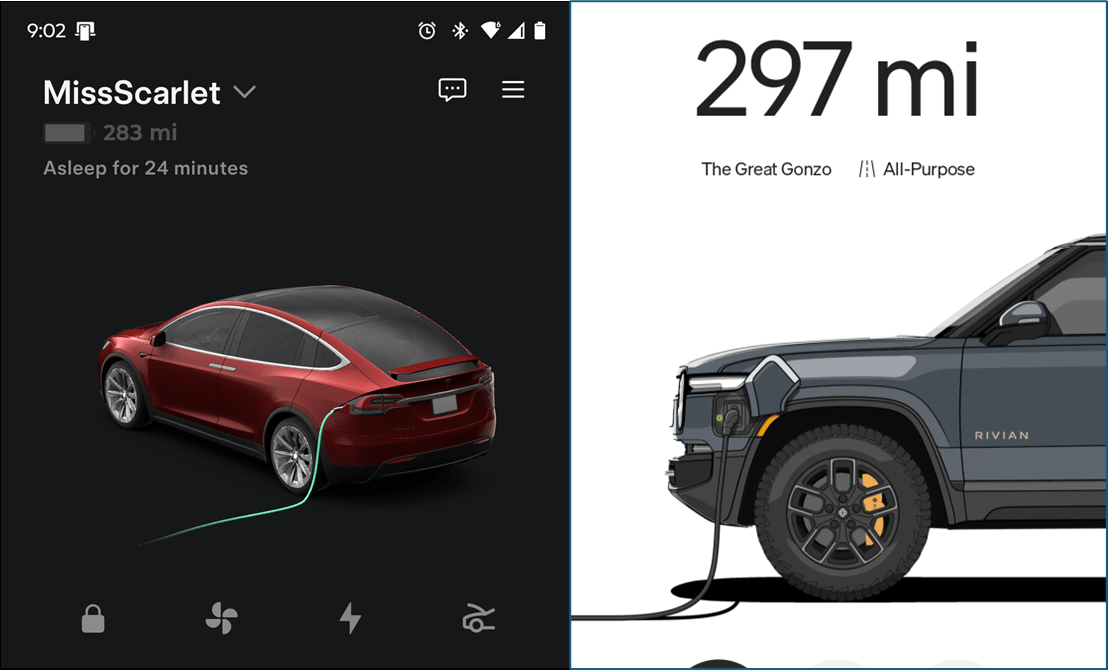
As I mentioned a couple of weeks ago, we recently traded in our trusty 2019 Tesla Model X (“Miss Scarlet”) for a 2025 Rivian R1S (“Gonzo the Great”). We bought the Tesla for a combination of selfish and political reasons, and traded it in for those same reasons. But I have strong feelings about the legacy auto industry and EVs — first because of the decades they spent trying to slow-boat the transition, and second because their EVs just kind of suck. I want a software car, not a legacy gas car with the engine swapped out.  

To me at least, Rivian stands out as the next generation of true EV first technology. Their experience with delivery trucks has given them a ton of experience in a tough environment, and Keep the world adventurous forever speaks not just to a sustainable future, but an awesome one.

So — into the breech we went. Our primary use cases for the car are pretty straightforward and unique to our weird lives:

  1. Short trips around town
  2. Ferry rides to and from Whidbey
  3. Multi-day road trips up and down the West Coast
  4. Drive in movies

I waited to write this until we had our first experience with #3. And while we did run into one significant unpleasantness (see “The Ugly” below), on balance I’m pretty enthused about the vehicle. Fingers crossed…

Purchase and Delivery

Industry inertia (and lobbies) are amazing things. Thanks to a bunch of archaic regulations wrt dealer networks, you can’t actually buy a Rivian (or a Tesla) in Washington State. When we went to test drive the car at University Village, the reps were very clear: we can’t talk about selling you this car, the price, your trade in, or anything like that. We’re just letting you take a ride in this wonderful vehicle and answering questions about it!

When it came time to actually buy the car, we had do so online, nominally from Illinois. They’ve done a good job with the process of providing them with documentation, signing notary forms, wiring money, etc. — actually way better than the typical dealer circus.

The car showed up at the Bellevue service center, and a super-enthusiastic lady spent an hour with us walking through all of the features. She was a bit over the top — but I appreciated what seemed to be honest enthusiasm for the car and the company. A good start! We waved goodbye to Miss Scarlet and drove off home.

Fun related fact — when the registration showed up in the mail, it showed a (large) itemization for use tax, the kind you pay to the state when buying a used vehicle from a private seller. This was in lieu of WA sales tax, and our last reminder of the dealership lobby — we actually bought the car “used” and imported it from Illinois!

The Good (a lot)

Our Rivian is an R1S “Tri-Motor” (SUV style). Fully-charged range is just under 350 miles, and those extra miles (compared to the X) really shine. It is super-fast and accelerates like a beast. Definitely BIG and TALL, even in “kneeling” mode — we added EV Sportline running boards to help folks get in and out more easily (a nice product BTW — we also bought their new Aero Cover Plates but I’d skip those next time).  

The suspension is crazy nice … the Tesla raises and lowers itself as well, but with a spread of 6.5 inches (from 8 to 14.5) the Rivian’s ability to adjust is insane. The road to our Bellevue house has these killer abrupt speed bumps — in the Tesla it was bone shaking; in the Rivian I barely notice them at speed (sorry neighbors).

Everything about the cabin is nicer as well. The boxy shape of the Rivian makes it way easier to transport stuff, the seats are cushy on my back even over a 12-hour day, and the console is well-designed so I can see everything (on the Tesla I kept having to peer around the wheel to see important stuff on the heads-up).

A frunk you can hose out is a great touch for those of us who use it to move trash.

I am in love with the wifi hotspot. Being able to cast any video to the car is super, although I have had an issue or two getting the phone to “see” the Rivian.

Dog mode (I mean “creature comfort”) is basically equivalent to the Tesla, but Camp mode is better in the Rivian. There’s a lot more control of what is on and off, and the automatic leveling feature is pretty nifty. Love the ability to illuminate around the vehicle easily, especially picking up mail or dropping trash late at night.

The adaptive/matrix headlights are simply magic. I posted a picture of their “charging” display last time, but the really cool bit is how they work when driving. Instead of just two headlights, there’s a whole bar of individually-focused LEDs which stay in high beam mode permanently. When they detect an oncoming vehicle or person they turn off only the lights directed at that object. The difference in visibility is striking.

Some of these are just better because the car is five years newer than our Tesla (Canada started allowing adaptive lights in 2018). But that doesn’t make me any less giddy; e.g., I cannot express how much I love the synthesized overhead view for parking. Did I mention it’s a big car? Having perfect view of lines and curbs is life changing.

The Less Good (Driver Assist)

Rivian has some great automated driving features, but it doesn’t touch the Tesla. I loved Full Self-Driving on our X. It isn’t perfect by any means, but the idea that the car really knows how to drive itself anywhere and in virtually any environment is a big, hairy, wonderful goal. And Tesla is getting there.

The Rivian is much more about helping you drive conveniently and safely — and it honestly does a very good job of that. It’s just not the same thing, at least not yet. It currently has three assist modes:

  1. Adaptive cruise control.
  2. Driver Assist. This is available on most highways and will keep you in your lane. It will perform safe lane changes on request only (using the turn signal).
  3. Enhanced Driver Assist. The same as #2 but hands-free. Available about 2/3 of the time that regular Assist is enabled.

Adaptive cruise works great, easy peasy. The quality of driving in the Assist modes is solid but it does get fooled sometimes; our working theory is that it struggles with spotty road coloring and lane markings. A few times we got into a weird harmonic where it kept swerving back and forth within the lane, and twice on our big drive it lost track without knowing it.

The other challenge is that the Assist features are clearly map-driven. Of course the car is adapting to its immediate situation, but the features are enabled/disabled based on map location and how much the system knows about the road layout. Because roads are always changing, this means that the feature frequently turns itself off and on. This is especially true with Enhanced mode — there are significant parts of I5 where it’s just not worth using it, because it’ll just be off again in thirty seconds.

The eye tracking is also really aggressive — I can barely pick a song on the main console without it yelling at me to look at the road.

All in all — by the middle of day one I’d figured out the idiosyncrasies and we were humming along pretty well. The overall experience is a lot like the Tesla before FSD. But I expect it will take a big stair step before they’ll go much beyond that — we’ll see.

The Ugly (Battery Temperature)

OK, this one was a killer. I’m optimistic that it’s not a fatal flaw in the car — when we’re back in Bellevue I’m going to have them see if we may be a victim of a bad cooling valve; hopefully that’s all it is. Still, it sucked.

We were impressed with our first stop at an EVgo station in Aurora, OR. The charge was amazingly fast compared to what we were used to with the X. In and out, off we go.

The second stop was a Rivian Adventure Network station in Roseburg, OR. It was pretty warm out at this point, about 92. Started fine (and fast), but after taking the dog out to walk for about ten minutes I returned to find the charger at about 2kW (for reference this is about what we get off the 120V outlet at our house). Huh.

Here’s where I think I made things (much) worse, although it falls into the category of “the car should have known better” for sure. Unclear why the charge rate had dropped, I just unplugged and plugged back in. That worked for a few minutes, then it dropped again. I tried rebooting the car and then again with a different charger. Worked for a bit and then dropped. Eventually I decided we had enough charge to get to the next stop anyways, so we’d just leave.

Pulling onto the onramp, the accelerator didn’t respond but then jerked forward so I just kept going. Within about five minutes on the road, the car entered “turtle mode” (I have learned these are dreaded words in the Rivian world) and dropped speed to 20mph. I crept along to the next exit as speed continued to drop. We parked the car in a safe spot and tried to figure out what was up.

Rebooted the car again and it seemed OK, so back on the highway and nope, same thing within about five minutes. At this point we exited and parked by the side of the road to call Rivian service (shout out to the multiple good folks who stopped ask if we were ok). Service was mostly uniquely unhelpful, although to be fair not sure what they could do — they offered a tow three hours north to the nearest Rivian service center, yeesh.

At the very end of a frustrating call, the rep suggested that battery temp might be an issue and showed us how to look at that … aha. The battery was close to redline at 132F, and surely had been much higher before we sat talking to service for a half hour.

Aware of the issue, we were able to get back on the road, watch the temp around charging stations, and make it down to Ventura without further incident through air temps of 100F and worse. Thanks to the Seattle PNW Rivian Facebook group for offering online therapy while we were in the hotel that night! TLDR:

  • We don’t know why the initial charging speed drop happened.
  • I surely made it much worse by forcing high-speed charging on a hot battery.
  • Bumping up against the 130F mark isn’t unheard of in extreme heat, but it seems likely that there is something suboptimal going on with our heat pump.
  • Limiting fast charges to 85% seems to do the trick; I have no concerns about getting comfortably back to Washington where we’ll have them take a look. Knock on wood.

I’m a Mac, and I’m a PC

At the end of the day, buying a Rivian feels a lot like using Windows instead of a Mac circa the late 90s. The Mac mostly just worked — as long as you used an Apple printer, Apple Mouse, Apple networking, Apple development tools, etc.. The PC had incredible power and a zillion innovative options, but you paid for that in complexity and reliability. Downloading drivers and keeping them up to date was (still is) such a hassle.

Side note: amusingly, in their attempt to capitalize on these real differences, Apple turned John Hodgman (“PC”) into an everyman hero. Who didn’t love that guy?

Boy, does this apply to charging — with the Tesla you mostly stay in your network, and they’ve made the system pretty idiot-proof. This is decaying over time for sure … but the difference is still very much there. From one icon to eight!

The running boards are another example. It’s pretty clear that the car needs them for many folks to comfortably climb into the car. But rather than make them standard, an ecosystem of accessory companies has emerged, each with their own features and quirks (be careful that the Rivian service folks can reach the official jack points!). The community seems to revel in the optionality and DIY of it all, and it is pretty cool — but also complex.

Or take the video streaming. I can watch way more stuff on my Rivian thanks to Google Casting vs the strictly-controlled theater apps on the X. But to use it you need to stream from your phone which is always a bit flaky, and the phone has to be on the car’s hotspot vs. any other Wifi network, and…. you see what I mean.

Early Conclusions

Feeling “stuck” in the middle of a road trip is a deeply crappy experience, and it’s hard not to let that color my first impressions. But I really wasn’t stuck, and in retrospect the issues seem pretty clear and fixable, even before we get it into service.

Taking that for what it is, I really do love the car. I don’t hide my politics and I do feel better knowing that I’m no longer adding to the damage that Elon is doing to my country, but that’s just a part of it. The Tesla is looking more and more like an amazing, ground-breaking, super-awesome first generation of the real EV transition — and that it’s time for the second generation to take the wheel (ha).

Rivian is doing that. They’ve built a sweet product that is fun and comfy to drive, has truly state-of-the-art features, and is positioned to win the day. Both over Tesla and the legacy automakers who, as we all know, really just wish the whole thing would go away. I’m calling it a win.

Interaction at the Edges

There’s a rule of multithreaded programming that says that if something can happen, it will. Package delivered at the same time the kitchen catches on fire and ALF is on live TV? For sure. I’ve been in countless debugging sessions where things that “can’t” happen absolutely, 100% happen.

Users are clever

Users are the same way. They may not all be tech savvy, but they’re incredibly creative. As with most things in my career, I first really learned this in the early 90s on the Microsoft Works team.

Works included simple desktop publishing features for making newsletters, invitations, posters, that kind of thing. Our customer service team sent us a case they were stuck on — the app would no longer let a user add content to their newsletter. It was a simple one-page document: header, footer, a few columns of content, maybe an image or two. That’s it. They tried saving a copy and using the new file, but no luck. They really didn’t want to start from scratch (I think they’d inherited the document from their predecessor).

The aha moment finally came when the rep asked the user to describe every action they were taking. Take last month’s article content, drag it off the page, add a new …. wait, what?

It turns out that this user didn’t know how to “delete” content blocks. But they realized that objects outside of the page boundaries on screen didn’t print — so each month they would just drag the old content blocks off the page and add new ones. Genius!

Except of course, the file got bigger and bigger and slower and slower until it just broke. I don’t remember if it was a memory problem, or if there were limits on the number of objects in a file, or what — but either way, a little education on “delete” and the newsletter was back in business.

We never expected users to be confused about deleting things. We never expected them to consider the off-the-page area as part of the real working space. More subtly, we’d never thought much at all about “periodicals” that used the same template time after time. And all of that’s on us — the user just found a creative way to do what they needed to do.

Whose car is it anyway?

A couple of weeks ago we traded in our Tesla Model X for a Rivian R1S. If you know me you know how conflicted and sad I am about Elon (see here, here and here), but that’s a story for another day. We’ll take the Rivian on its first Cali road trip soon, and I’ll write up a comparison then. Stay tuned.

Before we traded in the Tesla, I logged us out of all the various accounts that we’d set up on the vehicle. At the Rivian service center we signed over the title, handed them the key fobs, and waved goodbye to “Miss Scarlet” as we drove our new car home. Done and dusted!

Later that day I got a phone notification that the Tesla doors were unlocked. When I opened the app it turned out that I was still fully in control of the car. Huh. I honked the horn a few times for fun and then moved on with my afternoon.

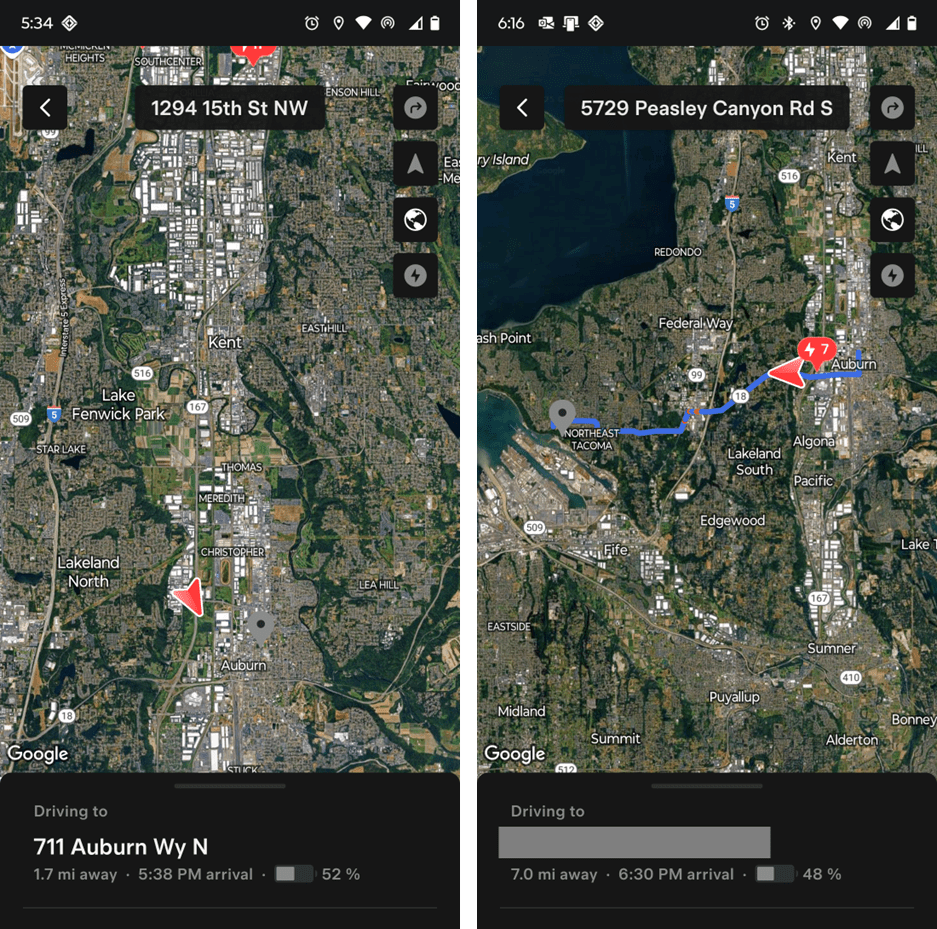
Now this isn’t really all that surprising — of course Tesla didn’t know we’d sold the car; that’s not how it “works” in the industry. But it’s an interesting edge case, and one I thought about frequently over the course of the next week as Miss Scarlet made its way through the resale process. I didn’t snap pictures of the car sitting at the Bellevue service center, but once it moved down to Kent I thought it’d be fun to keep a record.

First stop, Manheim Seattle Auto Auction. The Manheim facility is pretty huge; the car started in the middle of a huge lot, then next to a little outbuilding. It then appeared to move into a garage — probably for detailing — before bouncing from spot to spot in the lot again.

After a few days I got a navigation alert and found the car driving on its merry way to Worldwide Auto Group in Auburn. Two days later another alert and it was en route to a private home in Tacoma. I’ve masked out the address on that one because I’m assuming it’s an actual person who bought the car.

FINALLY, after eight days, a notification popped up on Lara’s phone that Worldwide was asking to take “ownership” of the Tesla — we agreed and and off she went into the sunset, leaving the Ventura Powerwall as the only Tesla product in our world.

What to make of this? Certainly I wasn’t “intended” to retain control of the car after I no longer owned it — but did it really matter? I think so — during this period I could see exactly where the car was, lock and unlock it, remote start, summon it if I was anywhere near by, and quite a bit more. It seems like bad guys have managed some pretty nasty stuff given a lot less access.

It’s always the edges

As someone who built their career around the craft of software engineering, it’s tough to get old and watch crappy AI and copy/paste code take over more and more of the world. Don’t get me wrong, it’s happening because mostly it does the job, and usually cheaper. But that doesn’t mean I need to like it.

Still, at least for now, the game is still on. Designing for the unexpected and the edges and future still matters, and those aren’t, so far, things the machines do well. Sometimes it’s an issue of technology and errors and such; more often it’s about user interaction. Don’t write us off quite yet!