Developing An Intuition for AI

AI is changing the world. Yes we are in a bubble and current claims are overblown and countless stupid companies are being started and a ton of investment capital is being thrown away. But don’t let anyone tell you (even if it feels good) that it’s all smoke, mimicry and plagiarism. They are incorrect.

There’s no substitute for direct experience — sit down and try it for yourself. You’ll quickly begin to develop an intuition for what it can and can’t do well. You’ll find amazing insights and unsettling failures, and learn how to direct it towards positive outcomes. The people that understand this will thrive on the other side.

To get you rolling, here are two quick, real-world anecdotes from earlier this week — and a few thoughts about why they went down the way they did.

1. Let’s Go Narrowboating!

For years I’ve been fascinated with the UK’s extensive canal network and the narrowboats that travel them. Lara and I are planning to meet some friends in the Cotswolds next year, and I’m trying to convince them that we need to rent a boat and spend a few days on the water.

Of course, the sum total of my experience with narrowboating comes from watching Pru and Timothy on TV, so where to start? These days it’s AI, of course. I started with this very exploratory opening salvo (including the heartbreaking typo literally on word #1!):

I’m need help planning a trip. My wife and I are 56 and would like to spend about three days exploring the Kennet & Avon Canal in a rented narrowboat. We’ve never been on a narrowboat or the canals before so we are beginners! We’d like a peaceful, quiet trip with a few locks but not too many. We’d like to have the option of staying in hotels at night, or at least mooring in villages with nice restaurants and pubs. Can you help me get started?

Here’s a record of the full conversation. Along the way the model made two errors of consistency, each of which could have been disastrous: (1) it would have stranded the boat at the end of the trip because it didn’t consider having to return it; (2) it both warned me not to travel the Caen Hill locks and then recommended a mooring point that would have required doing so.

But the final result, created soup to nuts in just over twenty minutes, is a remarkably useful and comprehensive itinerary: 4-Day Narrowboat Holiday Guide for Beginners. Good enough to rival the most helpful travel agent.

2. Let’s Build a Web App!

Life on Whidbey Island is dominated by weather, tides and ferries. I’ve got a bunch of apps and sites I use to monitor this stuff, and for a long time I’ve wanted to put together a little mobile-friendly web site to unify them all.

This isn’t particularly complicated. My personal weather station and the NOAA tide stations have APIs, and I’ve previously hacked up the WSDOT ferries site so I can pull images. There’s even a REST API that can monitor water levels in our community tank. The only hangup is the user experience — I despise, and am not particularly good at, building usable, nice-to-look at HTML/CSS interfaces.

I was skeptical, but what the heck — let’s ask Claude Code to give it a try. I set up my project, told Claude to figure out how it worked (generating this artifact, kind of amazing in and of itself), and then made this request, again with some embarrassing typos:

The file src/Tides.jsx is set up to fetch a json url representing a high and low tides for today and the following four days; right now it just displays that json text in the component div. I would like to render this information in a way that fits into the “card” display of the site.

Please write javascript that will create an HTML representation of the information that contains a simple graph of high and low tides over the period, with a vertical line marking the current time. The graph should show a smooth curve between highs and lows using the rule of twelfths (please indicate if you do not know what this is).

Below the graph should be a table of each high and low from earliest to latest.

An example of the javascript is in /tmp/tides.json.

The display should fit into the card that contains the content without expanding its width. It should render well on desktop and mobile browsers.

Please give it a try. Please only edit the file src/Tides.jsx so it’s easy to keep track of your work.

Here’s the complete set of interactions I used to create and fine-tune the tides HTML. There was a small bug rendering the horizontal axis to my specification, but most of the back-and-forth is me changing my mind about how to render the chart and table. It even figured out that “src/Tides.jsx” was the wrong relative path, and edited the correct file without saying anything. Really, really impressive.

The final result, saved to my phone’s home screen and already used a ton: Witter Beach Commnity Web Site

A Few Takeaways

Brilliant, Expert Synthesis

The best travel agents have always been those who really, deeply understand:

  • The client. Who are they, what are their preferences, how much do they want to do in a day? Do they have any specific physical limitations? Do they want things scheduled to the minute or are they free spirits? How do they react when language is a barrier? What do they want to learn? Is it OK if their tour guide is a hugger?
  • The locale. Which museums are worth it, and how much time do you really need? What restaurants are an easy walk even at night? Which guides love to talk about wars, or sex, or food, or sport? When do you really want AC and when is it an option? Which side of the hotel is quieter and which has the best views?

This is stuff that’s really hard to pull out of even the best guidebooks, especially in combination with human idiosyncrasies — everyone is a different in some weird way. The best agents put all of this together into a coherent whole that just works.

Front-end web code is the same way — you need to understand not just the data you’re trying to render and how the user wants to see it, but also the incredibly arcane details of rendering HTML and CSS across different browsers and different devices.

This is where AI shines. It knows an incredible amount of “stuff” — more by far than any human that’s ever lived. It has extracted little nuggets out of reviews and support sites and other nooks and crannies that are extremely niche and hidden. It can hold a ton of these variables together, all and once, and mix and match and sort and connect them with a specification or request.

Any time you’d seek out an expert that knows “the secrets” and is willing to listen to what you really want — AI is going to be your best friend.

Trust but Verify

The popular press loves to point out “catastrophic” AI failings, a great example being the mistake of both telling me to stay away from Caen Hill and sending me through it. But it’s actually pretty easy to avoid things like this if you use careful phrasing (which I did not). For example, “Please double-check that your recommendations are consistent, that stops and landmarks line up with the route you’ve selected.”

Also, note my instruction to Claude that it should tell me if it doesn’t know the “rule of twelfths;” AI wants to please and needs reminders to stay in line. I use phrasing like this a lot when doing research: for example, “Please only provide data based on concrete information for which you can provide citations. Do you best to avoid bias or incomplete data sets and do not make up anything you don’t actually know to be correct.”

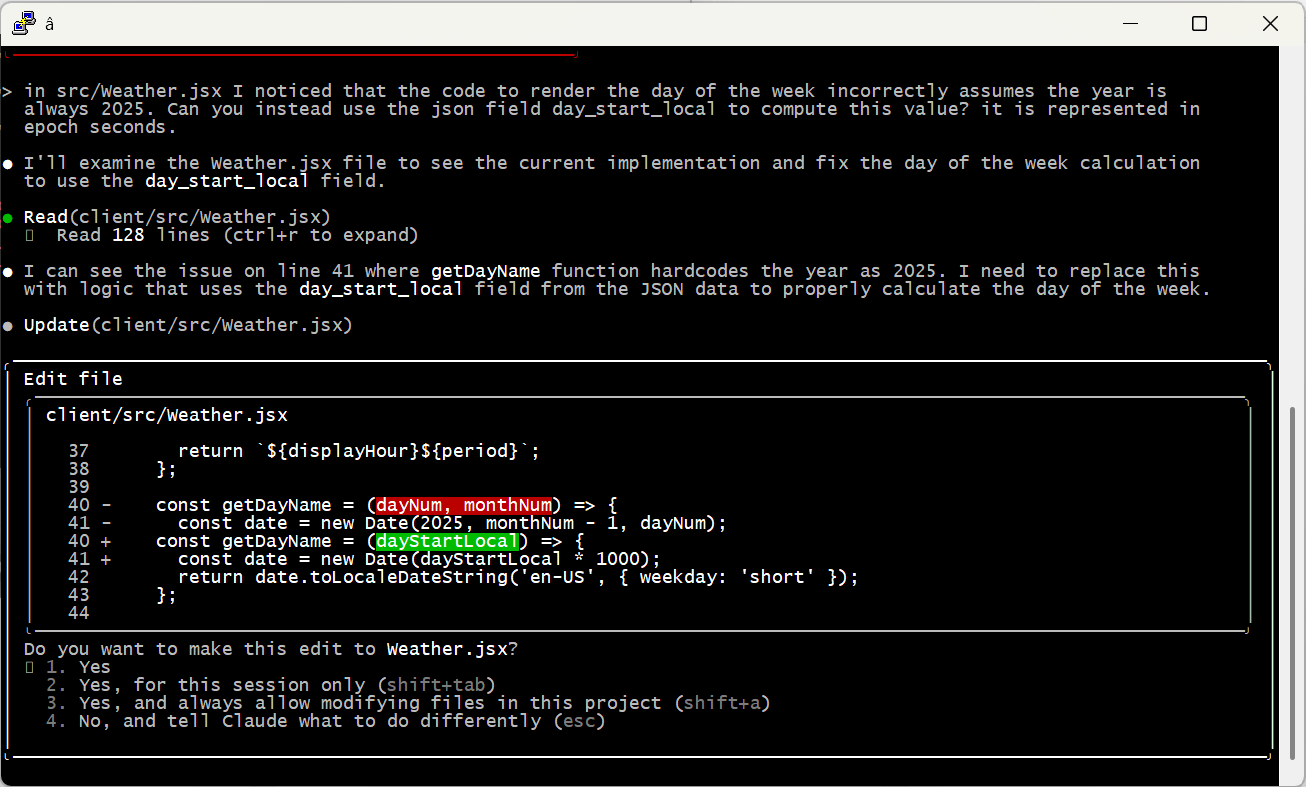
And of course, check the work yourself! Even the most senior human developers get a review before sending code to production; it’s no different with AI. When I asked Claude to code up the weather display, it created a bug by assuming it would always be 2025 — an issue that would have been invisible (for a few months at least) without manual review.
Embrace the Conversation

I find it most effective to simply talk to AI like I’d speak to a human. Set up tasks with details, examples and boundaries — just enough precision to minimize ambiguity while allowing space for learning, initiative and creativity.

I also simply cannot help but add “please” and “thank you” and “great job” and “my bad” into the conversation. That may seem a bit weird, but the agent is doing work for me, and I appreciate it, so why not acknowledge it? I actually think it leads to better outcomes, too. Maybe that’s all in my head, or maybe I just give better instructions in that mode. Either way I’m sticking with it.

Modularize and Limit Complexity

Looking back at the Caen Hill problem, it’s pretty clear what went wrong. Claude found that Denzies was a good stopping point based on distance and had great moorage, hotels and restaurants. On another thread it remembered that we were narrowboat beginners and should avoid tougher sections like Caen Hill. The failure was in missing the connection between these two factors — we couldn’t both avoid the locks and stop in Denzies.

Reminding the model to pay attention to these conflicts helps a ton. But there are still practical limits on how much they can handle at one time. A few weeks ago I tried playing with this by describing a relatively complex app. I purposely tried to do it all in one shot, something that is not recommended by anyone. 😉 The spec is here if you’d like to take a look.

As predicted, it was an abject failure. The model tried to break the problem up into pieces, but it was fundamentally unable to satisfy all the constraints at once. It would ignore requirements and lie about it, then break other stuff when it was caught out … just a mess.

At the end of the day, models can become overwhelmed — just like people. I’m sure the state of the art will keep evolving (“agentic” AI may be one step on that path), but for now the onus is still on humans to organize problems into tasks the machines can do.

A Miraculous World

I think that’s enough for one post. I just can’t encourage folks enough to spend time with these models and get a real, hands-on, hype-free sense of how they work, their strengths and their weaknesses. Don’t get sucked into the simplistic narratives of the popular press; on both “sides” of the AI issue they’re more about fitting the technology to their ideology than real understanding.

The reality is amazing and beautiful. And scary. And it’s here.

Real-world IoT with LoRaWAN

Remote monitoring of a community water tank for under $500, that works kilometers away from wifi or cell service, incurs no monthly fees, and uses a battery that lasts up to ten years? The future is here! I’m super-impressed with LoRaWAN, The Things Network and my Milesight Sensor. Read on for all the nerdy goodness.

The Setup

Southern Whidbey Island, geologically speaking, is a big pile of clay covered by a big pile of sand. As I (barely) understand it, when glaciers moved in from the North, they plowed heavy clay sediment in front of them, which got trapped in lake beds formed when north-flowing rivers were blocked by those same glaciers. These big blobs of clay (in particular the Lawton Formation) sprung upwards as the glaciers retreated, the same way a pool float does when you climb off, creating the island. The retreat also left a bunch of looser stuff (sand and gravel) on top of the clay. Since then, tides and waves have been continually carving away the sides of the island, leaving us with beautiful high bluffs and frequent landslides. These UW field trip notes go into more and surely more accurate detail, but I think I’ve got the high points right.

Anyway, I’m lucky enough to live at the bottom of one of those bluffs. How our property came to “be” is a great story but one for another time — ask me sometime when we’re hanging out. For today, what’s important is that groundwater collects along the top of the impermeable clay layer in “aquicludes,” what a great word. And that’s where we collect our drinking water. It’s a pretty cool setup — three four-inch pipes jammed into the hillside draw water that’s been filtered through tons of sand and gravel before hitting the clay. The water is collected in a staging tank, then pumped into two holding tanks. A smaller 500 gallon one sits at house-level, and a bigger 2,000 gallon one is most of the way up the bluff.

It’s a bit janky, but gets the job done. Until it doesn’t. Like last July 2nd, two days before 30+ family and friends were to show up for the holiday weekend. The tanks went completely dry and it took us both of those days to figure out the “root” cause. See, I put quotes around the word “root” because it turns out that there were TWENTY-FIVE FEET OF TREE ROOTS growing through the pipes. Completely blocked. Clearing them out was quite a chore, but we got it done and July 4th was enjoyed by all, complete with flushing toilets and non-metered showers. All of which is just background leading to my topic for today.

LoRa / LoRaWAN

Our July 4th saga prompted me to set up a monitoring solution that would give us some advance warning if the water supply starts getting low. The obvious place to do this is the 2,000 gallon upper holding tank, because it’s the first place that goes dry as water drains down to our homes. The tank shed is too far from my house to pick up wifi, though, and while there is some cell coverage, I wasn’t psyched about paying for a monthly data plan. What to do?

It turns out that there is an amazingly cool technology called LoRa (aptly, for “Long Range”) that is tailor-made for situations just like mine. There’s a lot of terminology here and it can be tough to sort out, but in short:

  • LoRa is a physical protocol for sending low-bandwidth messages with very little power over very long distances. It’s actually a proprietary technique with the patent owned by Semtech, so they control the chip market. Kind of unsettling for something that is otherwise so open, but they don’t seem to be being particularly evil about it.
  • LoRaWAN is a networking layer that sits on top of LoRa and the Internet, bridging messages end-to-end between devices in the field and applications (e.g., dashboards or alerting systems) that do something useful with device data.

A bunch of different players coordinate within these two layers to make the magic happen. There’s a great walkthrough of it all on the LoRa Alliance site; I’m going to crib their diagram and try to simplify the story a bit for those of us that aren’t huge radio nerds:

Image adapted from semtech.com; click for original
  • End Devices sit in the field, broadcasting messages out into the world without a target — just signals saying “HEY EVERYBODY IT’S 100 DEGREES HERE RIGHT NOW” or whatever.
  • Gateways harvest these messages from the air and forward them over TCP/IP to a pre-configured…
  • Network Server (LNS) that typically lives on the Internet. Network servers are the traffic cops of this game. They queue messages, send acknowledgements, delegate “join” messages to a Join Server and device messages to an Application Server, etc.
  • Join Servers hold the inventory of end devices and applications within the larger network, and knows which devices are supposed to be talking to which applications. Join Servers also manage and distribute encryption keys to ensure minimal information disclosure. I won’t dive into the encryption details here, because yawn.
  • Application Servers receive device data and get them to the right Application.
  • Applications are logical endpoints for specific end device data. This is a bit tricky because a LoRaWAN application is different from an end-user application. There is often a 1:1 relationship, but the LRW application accepts and normalizes device data, then makes it available to end-user applications.
  • End-User Applications (not an official LRW term, just one I made up) actually “do stuff” with device data — create dashboards and other user experiences, send alerts, that kind of thing. End-user applications typically receive device data through a message queue or webhook or other similar vehicle.

The most common LoRaWAN use case is “uplink” (devices send info to apps), but there are also plenty of uses for “downlink” where apps send to devices: configuration updates, proactive requests for device information, whatever. A neat fun-fact about downlinks is that the network server is responsible for picking the best gateway to use to reach the targeted device; it does this by keeping track of signal strength and reliability for the uplinks it sees along the way. Pretty smart.

Picking a Network

Despite the nifty encryption model, many enterprises that use LoRaWAN for mission-critical stuff set up their own private network — which really just means running their own Servers (I’m just going to call the combo of Network/Join/Application servers a logical “Server” going forward). AWS and companies like The Things Industries offer hosted solutions, and a quick Google search pops up a ton of open source options for running your own. There are also quite a few “public networks” which, kind of like the public cloud providers, share logically-segmented infrastructure across many customers.

More interesting to me is the pretty amazing community-level innovation happening out there. The Things Stack “Community Edition” was one of the first — anybody can set up devices, gateways and applications here. It so happens that our outpost on Whidbey Island didn’t have great TTN coverage, so I bought my own gateway — but with more than 21,000 connected gateways out there, in most metro locations you won’t even have to do that. The gateway I bought grows the community too, and is now there for anybody else to use. Sweet!

Side note: I actually bought my gateway almost two years ago (part of a different project that never made it over the finish line), so it was there and waiting for me this time. But if I was starting today I might (even as a crypto skeptic, and appreciating its already checkered past) take a look at Helium instead. They basically incent folks to run gateways by rewarding them with tokens (“HNT”) which can be exchanged for credits on the network (or for USD or whatever). Last year they expanded this (only in Miami for now) system into cell service. I dunno if these folks will make a go of it, but I do love the idea of a “people’s network” … so hopefully somebody will!

Here’s my gateway running on The Things Network:

Picking a Device

Measuring the amount of liquid in a tank is an interesting problem. We use a standard float switch to toggle the pump that feeds the tank, turning it on whenever the level drops below about 1,800 gallons. This works great for the pump, but not for my new use case — it only knows “above” or “below” its threshold. I want to track specific water volume every few minutes, so we can identify trends and usage patterns over time.

A crude option would be to just use a bunch of these binary sensors, each set at a different height (it’s about six feet tall, so say one every foot or so). But that’s a lot of parts and a lot to go wrong — there are a plenty of better options that deliver better measurements with less complexity:

  • Capacitive measurement uses two vertical capacitive plates with an open gap between them (typically along the insides of a PVC pipe open at both ends. As liquid rises inside the pipe, capacitance changes and can be correlated to liquid levels.
  • Ultrasonic measurement is basically like radar — the unit mounts at the top of the tank pointing down at the liquid. A pulse is sent downwards, bounces off the water and is sensed on its return. The amount of time for that round trip can be correlated to height in the tank. The same approach can be used from the bottom of the tank pointing up — apparently if the transducer is attached to the bottom of the tank, the signal won’t reflect until it hits the top of the liquid-air boundary. Amazing!
  • Hydrostatic pressure sensors are placed on the inside floor of the tank and the relative pressure of water above the sensor correlates with depth.
  • A number of variations on the above and/or float-based approaches.

After a bunch of research, I settled on a hydrostatic unit — the EM500-SWL built by Milesight. Built for LoRaWAN, fully sealed, 10 year battery life, and a relative steal at less than $350. I was a bit worried that our tank would be too small for accurate measurements, but Asuna at Milesight assured me it’d work fine, and connected me with their US sales partner Choovio to get it ordered. They were both great to work with — five stars!

Setup at the tank was a breeze. Connect the sensor to the transceiver, drop the sensor into the tank, hang the transceiver on the shed wall and hit the power button. Configuration is done with a mobile app that connects to the unit by NFC; kind of magic to just hold them together and see stuff start to pop! By the time I walked down the hill to my house, the gateway was already receiving uplinks. Woo hoo!

Setting up the Application

OK, so at this point the sensor was broadcasting measurements, they were being received by the gateway, and the gateway was pushing them up to the Things Network Server. Pretty close! But before I could actually do anything with the readings, it was back to the Network Server console to set up an Application and “activate” the device. Doing this required three key pieces of information, all collected over that NFC link:

  • DevEUI: a unique identifier for the specific device
  • JoinEUI: a unique identifier for the Join Server (the default in my device was, happily, for The Things Network)
  • AppKey: the key used for end-to-end encryption between the device and application

Applications can also assign “payload formatters” for incoming messages. These are small device-specific scripts that translate binary uplink payloads into something usable. Milesight provides a ready-to-go formatter, and with that hooked up, “water_level” (in centimeters) started appearing in each message. Woot!

Finally, I set up a “WebHook” integration so that every parsed uplink from the device is sent to a site hosted on my trusty old Rackspace server, secured with basic authentication over https. There are a ton of integration choices, but it’s hard to beat a good old URL.

And Actually Tracking the Data

At last, we can do something useful with the data! But as excited as I am about my monitoring app, I’m not going to go too deep into it here. The code is all open sourced on github if you’d like to check it out (or use it for something) — basically just a little web server with a super-simple Sqlite database underneath. Four endpoints:

  • /witterhook is the webhook endpoint, accepting and storing uplinks.
  • /wittergraph uses chart.js to render levels over time.
  • /witterdata provides the JSON data underlying the chart.
  • /wittercheck returns a parseable string to drive alerts when the levels go low (3.5 feet) or critical (2 feet).

For the alerting, I’m just using a free account at Site24x7 to ping /wittercheck every half hour and send email alerts if things aren’t as they should be.

So there you go. There are already obvious patterns in the data — the “sawtooth” is so consistent that there must be a steady, small leak somewhere in the system below the upper tank. Our supply is keeping up with it no problem at the moment, but definitely something to find and fix! It’s also clear that overnight sprinklers are by far our biggest water hogs, but I guess that’s not a shocker.

Now I just have to figure out how to auger out the rest of that root mass. Always another project at the homestead!