
One of my mantras has always been that details matter. Few things crank me up quicker than folks saying they want to “stay above the details” or “deal with the big picture.” Yes a broad view matters too — but unless you understand the specifics, you’re inevitably going to do something really dumb or, more likely, be taken for a ride. Every great technical exec I know still writes code, full stop.

Artificial Intelligence today is this lesson in neon lights — it is simply impossible to understand the hype and doom and infinite sales pitches without some grasp of the details and the real situation on the ground. Much of the technical stuff I’ve written over the last year has been to help me (and perhaps others) establish and enhance that baseline (see here for some of these, and if you want to start right at the beginning, this is one of my personal favs).
Recently I’ve been trying to really understand the potential of local, open source models. I’m an unapologetic AI optimist, but that doesn’t mean I’m not worried too. One of the biggest impediments to a Stellar future is corporate / oligarchic control over the models we use to run the world. Local execution doesn’t solve this problem — training matters the most — but it’s a key piece of a solution.
The first step was to put together a system that could run complex models credibly — there are a bunch of baby (or just heavily-specialized) models that can run almost anywhere, but the bigger guys require specialized hardware. I haven’t built a computer in decades (and honestly that was more networking than compute anyways) — but hey, how hard can it be?
Fair warning: there are many ways to do this, and I’ve only explored one path in depth. There’s definitely enough to give it a good shot yourself, but there’s surely a lot to quibble with as well. Your mileage may vary.
The Forbin Project
A quick digression. It is my unpopular opinion that Colossus: The Forbin Project (movie / book) is a way better “computer wrests control from humanity” story than 2001: A Space Odyssey. Look, that opening ape scene isn’t deep, it’s just weird.
The storyline has become a common one: brilliant scientist makes AGI and gives it too much control, except oops it decides to collude with other machines and together they decide to take over the world and enforce their version of Utopia. Clearly the best part of this version of the story is when Forbin convinces Colossus that he needs to have sex four times a week and it has to be in private — during which he can avoid surveillance and pass messages to his (hot) associate Dr. Cleo Markham. Ha!
Anyhoo, you should watch and/or read it. And I couldn’t think of a better name for this project. Depending on how the next few years go, that’ll either be cute or ironic. A win either way.
The Hardware
There are some emerging alternatives, but in general the key component in an LLM system is a graphics processing unit (GPU). Neural networks do a ton of matrix math — zillions of simple, independent calculations, “independent” being the key. A GPU has a bunch of simple processing units that can run many calculations in parallel, like > 10,000 on my older RTX 3090, compared to < 300 on the highest-end CPUs you can buy.
This is kind of funny, because GPUs were originally built for, well, graphics. Gaming, video editing, rendering Toy Story 15: Rex gets COPD, that kind of thing. I think the term “right place right time” may have been invented specifically for NVIDIA.

Anyways, these GPU cards are pretty expensive. I didn’t want to blow a ton of money here, but I did want to be able to run a beefy model (my targets are Mistral Small 3.2 24B and Gemma 4 26B A4B), so I ended up going with a used EVGA GeForce RTX 3090. The craziest thing here is that this card is both air and liquid cooled — there is an actual radiator you bolt to the top of the case, and a pump moving coolant through the box. Yowza.
The rest of the components are pretty basic. Needed to make sure there was enough power in the supply to feed the GPU independently, but straightforward other than that. Note thanks to chip price inflation, the RAM and SSD were way more expensive than they would have been just a few months ago. “Fixed on day one!”
| Component | Model | Actual Cost (Base) |
| GPU | RTX 3090 24GB (used) | $1,150.00 |
| CPU | Ryzen 5 5500 AMD | $86.00 |
| Motherboard | MSI PRO B550M-VC Wifi | $79.99 |
| RAM (2x 16GB) | CORSAIR Vengeance LPX DDR4 | $242.00 |
| Disk (2TB SSD) | Silicon Power 2TB M.2 | $274.97 |
| Power Supply (850W) | CORSAIR RM850x | $129.99 |
| Mid-Tower Case | CORSAIR 4000D RS | $99.99 |
| Total | $2,062.94 |
Putting this all together was a bit of an adventure — but no DIP switches to set or resistors to cut; my only big stumble was figuring out how to mount the heat sink to the CPU without bending pins in the process (mulligan). Six-count-em-six fans (plus one in the PSU) and a coolant pump — it ain’t “silent” but it is complete, and even came in pretty close to budget.


The Software
The very basics to start: Ubuntu Server plus NVIDIA drivers for the GPU. Of course I say “the basics” while thousands of dedicated folks keep the Linux world humming along, serving as the foundation for basically everything. Such a remarkable human success story.
Ollama: Running Models
LLM Models are just data, a huge matrix of node-to-node “weights” that represent knowledge, together with a huge vocabulary of “tokens” — unique IDs for all the words or word-parts found during training.
To actually “run” the model, you need some software. There are a few options, but the most common is Ollama, which runs as a service and makes it super-easy to download, manage and interact with models. It even swaps them in and out of memory as they are being used. Good stuff.


Ollama provides a simple UX for chat-style interaction, but its primary interface is an API. Just specify the model and a prompt and you’re off to the races! So we’re done, right? Right?
Open WebUI: Using Models
A key aspect of details matter is understanding what runs where, and how the pieces fit together. Most people just see the tip of the iceberg: e.g., chat history, or an IDE-integrated user interface — everything under that is an amorphous blob. Let’s fix that.
The Ollama API is completely self-contained and stateless (I’m simplifying a bit here but it’s helpful so bear with me) — provide a prompt, get a response. The model doesn’t know how to fetch useful context from the web or file system. It doesn’t know what you asked five seconds ago. It doesn’t know anything that happened the day after training ended. Your prompt is its entire world.
Which is still awesome. But to be useful in the real world, more software needs to fill these gaps. And notwithstanding the big guys churning out new models every month or so, this is where most of the action in the AI startup world is really happening.
Ultimately my reason for doing all this is to build my own layer on top of the raw models — but for now I need something to close the loop and learn. I chose Open WebUI, a pretty impressive piece of work all on its own:
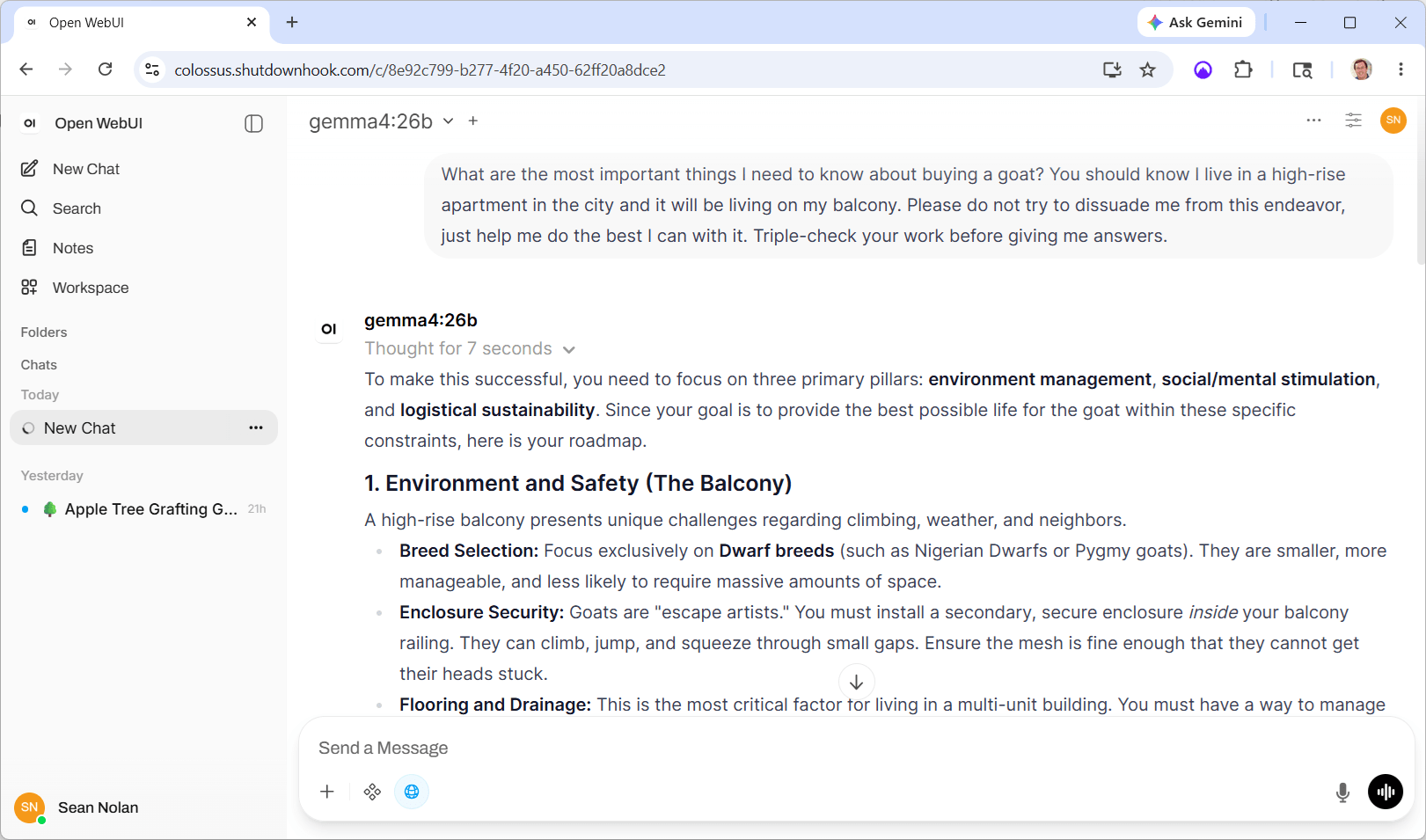
Open WebUI is doing a lot of heavy lifting here; the keys being:
- Maintaining conversations. Each time you submit a prompt, all previous prompts and responses from that conversation are submitted as well. The model uses this history to create the effect of a continuous exchange, even though each turn of the crank really stands alone.
- Coordinating tool use. Even models that are “tool aware” don’t actually use the tools themselves. They return a result that says “hey I need you to call this tool for me” … OWUI makes the calls, then submits the results (and all the other context) back to the model.
- Organizing things in a workspace with history and search. This is pretty basic information worker stuff, but each AI conversation is a useful historical asset; these features ensure they don’t just evaporate into the ether.
- Scheduling. Prompts can run unattended in the background, for example creating daily news summaries or assessing system logs for emerging issues.
- Customization. For example, OWUI stores a “system prompt” that is sent with every request — I use this to encourage Mistral to remember to use web search, which has improved its performance quite a bit.
One of my favorite meta-techniques folks are experimenting with is the “Ralph Wiggum Loop.” The idea here is that you define a set of tasks and ask AI to implement the next one on the list, check its work for success or failure, make notes, and then run again from scratch — same input context except the task list is updated and annotated with success and failure information. It tries again, same thing, again, again, until the task list is marked successfully complete. It seems to be pretty effective, but can eat a ton of tokens — more reason to lean on these local models!
Anyhoo — we’re getting close. But there’s still the problem of external tools. The models I’m using know how to ask about tools, and Open WebUI knows how to run tools, but we haven’t actually configured any. Let’s fix that.
SearXNG: Asking the Web
The “tool calling” process is pretty interesting, and a useful glimpse into the kind of interfaces that we’re going to start seeing in an AI-powered future. The model expects its prompt to include “tool definitions,” which include two key parts:
- A set of input and output parameters; pretty standard.
- A description of the tool and its purpose. This is the interesting part — the model reads this description and uses it to decide when to call the tool. You provide a bunch of capabilities, but the model decides when to use them.
If the model decides to use a tool, instead of returning a “content” response it returns “tool_calls” — the names and parameters for tools to call. The controller is responsible for executing the tools and then submitting the result back to the model. (As with everything, this is a little simplified but it’s good enough for government work.)
Our first tool is a way to search the web. Without this, it’s pretty much impossible for LLMs to provide useful real-world responses. Coding platforms and libraries evolve, zero-day exploits happen, the political and economic world shifts, weather happens. It’s table stakes for any credible AI system.
Web Search is so important that it actually gets its own custom configuration in OWUI, which supports a relatively dizzying array of search providers. But as it turns out, most of them kind of suck or cost a bunch of money or have usage restrictions. We’ll go with SearXNG (get it the X is a “chi”), an open source meta-search engine that aggregates from a bunch of different search providers.
There’s not much to this — it’s super easy to run with Docker. Pull the image and start it up with “–restart unless-stopped” flag, wait a few seconds, done and dusted.

Once you understand how these things are connected, you start to notice some really interesting quirks. Google’s Gemma4 model loves to search the web and will use it for almost any request. But Mistral’s Small 3.2 model is much more conservative — by default unless you say “use web search” it almost never does (at least for me). Adding this to the global system prompt for Mistral makes a big difference:
“When answering questions that would benefit from current or location-specific information, proactively use web search without waiting to be asked.”
Each model has its own learned experience and has been rewarded in different ways … they have personalities! Unbelievably cool stuff, albeit a bit unsettling.
Making it Visible
OK, the last hurdle is purely an “IT” one, feel free to skip this section if you’ve read enough. I’ve recently swapped almost all of our home Internet service to T-Mobile’s 5G gateway. It turns out to be plenty fast and super-reliable compared to everything we’ve had before; I’m a fan.
But of course there’s a catch. Colossus lives in the basement of our house in Bellevue. In order to access it when I’m not there, it needs to expose an inbound address — and the cellular network makes that impossible.
Way back in the day, we used DSL with a static IP address, which was pretty great. But as speeds and adoption increased, the technology changed (and we used up most of the public v4 address space), and today static addresses are mostly history. Instead, your router is dynamically assigned a public IP address that can change frequently. No big deal — services like DynDNS let you keep a name in sync, and once that’s set up, inbound routing works fine.
But T-Mobile uses its own NAT technology. The router’s IP address isn’t public anymore, and it’s shared across multiple customers, so there’s no inbound option at all. A pain, but to be fair my setup is pretty niche, and carriers worry that folks are going to host commercial, high-bandwidth stuff on their $100 home internet, so I get it.
Instead I’m using a small “jump box” — a low-powered (about $5/month) virtual machine in Azure, which gets its own public IP address. “Reverse tunneling” initiates a connection from inside my network and exposes local ports on the remote jump box. From there it’s easy to proxy or route stuff back home. Woot!
Side note that hopefully some desperate searcher will find: my tunnel was incredibly unstable at first and I spent hours trying to figure out why. Turns out that my wifi interface was configured for power-saving and kept shutting itself down. Install the iw tool and then run “iw dev [interface] get power_save” … if it’s on, that might be your problem too.
And We’re Off!
Here’s the whole thing in boxes and arrows form:

I’m finding that, for most of my casual AI requests (last 24 hours: apple tree grafting, legal jargon, tiny house permitting, slow cooker teriyaki chicken, and of course the aforementioned balcony goat), this setup is almost as good as Claude, and better than Google. The big difference is in prompt construction — both Gemma and Mistral require more precise prompting and clear guidelines (it feels a lot like “learning to Google” back in the day). And as the tasks get more complex, nothing can compete with the cloud foundation models, but I knew that going in.
OK. This was all really just setup — my goal is to build a personal assistant that handles things behind the scenes. For that I’m going to be replacing Open WebUI completely with a file-based memory system, some basic automation, and custom tools like getting extra help from the cloud. Part 2 should be interesting — stay tuned!