I really just meant this to be a response to Scott on LinkedIn, but both as a comment and an update they said it was too long. I thought they were all about keeping content on their own site? Seems self-defeating. Ah well.
You had the AI generate code for you to do the work: why? Why didn’t you simply have the AI do the computations and give you the result?
I can think of at least one answer: because it allowed you to double-check that the computations were being done correctly. But, most people don’t have the skills to do that.
How could you write a prompt that simply outputs the result and allows non-technical users to verify that it was done correctly?
This is a great check and thinking through an answer was quite interesting.
The explicit use of code was purely habitual. After realizing Excel alone would be tough for the problem, my personal toolkit immediately jumped to code. Claude Code is basically the perfect tool for folks like me that want to engage LLMs in code but are too obsessive to give up full control of their source. 😉
That said, the prompt itself wasn’t very code-focused, so as an experiment I just took out the node/javascript line and fed the same exact prompt to Claude Desktop using the same model (Sonnet 4.5). Results are here: https://claude.ai/share/f6a18011-d4da-4aa9-883f-45a98de01c0d
The model chose to write code anyways, BUT — this time it screwed the pooch in two ways. First, it missed a few of the fuzzy-match matches that the first version got right away. I think this is no harm / no foul — I emphasized conservatism in the prompt and you could argue the fuzzy match pushed that boundary anyways.
Much worse, it completely missed the “mode” column and ended up happily double/triple/quadruple counting votes! I was able to correct this easily, but had I not scanned the code with context and history it definitely wouldn’t have jumped out at me. Definitely highlights Scott’s concern.
So to the meat of the question (how to verify without code knowledge), a few thoughts:
First, I typically feel better feeding source data to models (like I did here) vs. having the model source the data itself (to be completely transparent, I did use Claude Desktop to help me find the data, but I vetted and judged its veracity myself through more traditional means). Having solid base data reduces the number of chances for the model to screw up, but more importantly it means I can use tools like Excel (or even hand calculations) to do my own spot checking of results — something much more accessible to folks that don’t code.
Second, I’ve felt for a long time that basic coding skills need to be a compulsory part of middle and high school education. This isn’t to make coders out of everyone — I think of it like a foreign language requirement. It doesn’t take a lot of exposure to code before you can read through JavaScript or Python and figure out what’s going on. You learn to look for things like hard-coded numbers and strings, can tell what a loop is doing, etc..
In the past I’ve thought this was important because coding itself was going to be critical — but maybe the new reason is that it can be something of a lingua-franca between humans and machines.
Over the long term, this remains one of the best “holy crap” issues that I don’t have a great answer for. Pretty quickly we’re going to get to a point where models don’t make truly dumb mistakes, at least any more than humans do. When I ask somebody on my team to perform a task, at some point I just have to trust that they did it correctly. That trust is gained through time, assessment of experience, maybe some spot checks at the start of the relationship, etc. … and probably the same thing will be true for models.
The only big (BIG) gotcha with this is that the models aren’t truly independent actors. They’re the product of commercial enterprises, so there are always legitimate questions about underlying motivation. Flipping that once again, it’s true for people too — we are the product of a lifetime of societal programming. Starting to feel like a freshman philosophy class, so I’ll leave it at that.
Anyhoo … thank you Scott, you made me think a lot harder about the ideas here!
To be clear, the title here is tongue-in-cheek. Real “research” involves carefully-designed and bias-controlled experiments, and there ain’t none of that below. My intended point is just that we’re all capable of digging deeper in ways that haven’t been the case before the advent of LLMs. Arming yourself with these tools is one way to fight the bullsh*t that is pushed at us every single hour of every single day.
Anyways, what started as a casual attempt to test the veracity of this story ended up as something much more interesting. Yes kids, it’s another AI-positive story, this one hidden behind some observations on the American economy.
Subsidy Tracker
One of the articles about Bass included a link to Subsidy Tracker, a site that combs through public records to identify federal, state and local subsidies by company. This is really messy data; we’re lucky there are non-profits making it usable.
Somehow I wandered from Bass over to the airline industry, where I found a ton of very recent federal grants —millions of dollars every month. Digging into these led me to the Essential Air Service program, and that started me down today’s rabbit hole. Bear with me for a second.
Essential Air Service
See, back in 1978 Jimmy Carter — yes, JIMMY CARTER — signed the Airline Deregulation Act, hoping to decrease fares and increase service by rolling back a bunch of controls on fares and routes. But the bill’s authors realized that without some new intervention, a deregulated airline industry would immediately drop service to smaller, less profitable locations like, say, my college home airport in Lebanon, NH.
They addressed this by creating the EAS and its list of “Essential Air Service Communities.” Airlines are paid real cash money by the federal government to provide regular service to these communities — to the tune of more than half a billion dollars in 2024. For example, Cape Air was paid $5.2M to ensure 54 people a day could fly one-way to or from West Leb. That’s about $2,400 per leg, even if they fly the plane empty!
And you know what? This is fine. Actually, it’s great. We, as a society, decided that we cared about maintaining integration of our rural communities with the rest of the country via passenger air. We also recognized that free market dynamics would not deliver this outcome, because the societal “cost” of not having service was borne outside of the immediate commercial players.
Of course there are risks to this. Collective actions are complicated and always subject to bias and graft — they’re never “optimal.” Our protections are mandated transparency, civil education and a free press. The EAS probably needs some tweaks, but on balance it seems like a pretty good call.
Like it or not, this kind of market-socialism hybrid has been our model pretty much forever — and increasingly so as we’ve become more interdependent through the industrial and information ages.
OK, Cool, Right?
Not so fast, Milton. A huge, possibly majority fraction of our country simply does not understand this long-standing reality. The Reds have spent decades — starting with talk radio in the 80s and culminating with MAGA today — telling people that we live in a perfectly free market economy, and that perfect freedom is the primary reason for the success of our nation. It’s a two-part strategy:
Emphatically label “bad” collective societal action as “communist.” (health care, minimum wage, food and unemployment benefits, UBI, …)
Ignore, bury and obfuscate the “good” action so the public doesn’t notice the hypocrisy. (corporate subsidies, military adventures, incumbent-benefitting pork, …)
The EAS is a great example of this. By definition the vast majority of EAS communities are in rural areas — places that likely supported Trump in the last election. But I’m pretty sure that if you asked residents in those communities if the government was playing to fly empty planes to and from their homes, they’d say (1) no way, and/but (2) we don’t want to give up our airport.
Ask a Simple Question
At this point in the story, I realized I should check my own bias. I mean, of course rural voters went for Trump, but it’s possible that EAS communities were somehow an outlier. So I started poking around for some data that would help me answer that question.
Little asks like this seem so simple! But as anybody who has ever tried to report on real-world data can tell you (say, for example, the DOGE wizards that “concluded” millions of dead people were drawing social security) it’s actually super-hard. First you have to find data — and for a lot of questions, that just doesn’t exist (see my comment at the top about real research), or it’s in an awkward or inconvenient form for analysis. In this case, however, it was pretty easy:
The Dept of Transportation publishes a current list of EAS communities. It’s a PDF, but that’s easy to extract into a CSV file with columns for city and state.
Progress! Often all you need from here is a little basic Excel magic (see here for some tips on that). Unfortunately for us, we hit our first stumbling block: election data is reported at the county level, while the EAS communities are cities. Mapping between those will take a little more data, but luckily that’s available too, compiled from government sources and released under a Creative Commons license: simplemaps US Zip Codes database.
Extract city, state and county columns from this file, match up the city/state with the EAS data, walk that through county to the election data, and Bob’s Your Uncle!
Finally, the AI Part
Well sure, it’s pretty simple in theory. But most of the country doesn’t have the skills to actually write this code. I mean, I’ve spent a career doing this sort of thing, but even so I’m not likely to invest the effort on a random weekend news-scrolling curiosity.
This is where foundational AI models can really change the game for everyone. It’s not without pitfalls, but take a look at what Claude Code was able to do with this prompt:
I’d like to generate a csv file that shows how each county that is considered an eligible community in the Essential Air Service program voted for president in 2024. Please use node and javascript for this script.
Data on EAS eligible communities is in the file eas.tsv. Data that translates city/state to county is in the file uszips.csv. Data that contains county-level presidential elections results is in the file countypres_2000-2024.csv.
You’ll need to read each city/state combination out of eas.tsv, then use uszips.csv to translate that into one or more county/state combinations.
With this information, look up the 2024 election results for those counties, sum up the votes if there are multiple counties, and output a row with the name of the candidate that received the most votes.
If you are unable to translate a city/state to county/state, or if that county/state is not found in the presidential election results, use “unknown” as the name of the winning candidate.
The output should have three columns: the original city/state from the EAS data and then then name of the winning candidate.
Please double-check your work and do not take shortcuts such as estimation or extrapolation. I want to be sure that the data you output represents direct matches only — if the data isn’t clear just say “unknown” and that’s ok.
I put a lot of detail in that prompt because (a) I’d already done the work to figure out data sources; and (b) I wanted to be very clear that the model should be conservative. First try: Winner-Winner-Chicken-Dinner!
More than Mechanical
A machine that writes code to crosswalk a bunch of files is pretty neat, opening up a deeper level of analysis to huge swaths of the population. But it gets really cool when you look under the covers. Review the entire conversation for yourself using this link.
The model wrote code, tested it, and iterated a bunch of times to discover and account for unique quirks in the data. It was a lot! Again, this will sound very familiar to anyone who has tried to do even moderately complex cross-source data analysis:
One file had full state names while the other had abbreviations. Create a lookup table.
The “mode” column is inconsistent. Most counties use “TOTAL VOTES” to represent totals, but some counties leave this blank, others use other terms like “TOTAL VOTES CAST” and others don’t have total rows at all so they need to be created by summing other modes. Normalize the values and created an algorithm that picks the most representative rows.
Some city names were slightly different across files. E.g., “Hot Springs” vs “Hot Springs National Park.” Use partial matching to address.
Spacing and casing differences. Strip spaces and lowercase everything before matching.
Additional differences in punctuation and abbreviation. Use a normalization table.
All of these were found without further prompting or intervention. And as the cherry on top, the model even realized that the two Puerto Rican EAS communities weren’t in the election data because Puerto Ricans can’t vote for president.
Of course, given the state of LLMs today I still wouldn’t just trust the output without reviewing the code and doing some spot checks. In this case at least — did that, and it passed with flying colors.
TLDR, my assumption about Trump voters is backed up by the data. Not earth shattering perhaps, but anything that makes the world a little more fact-based is a Very Good Thing. And most importantly, thanks to LLMs, this kind of research is available to all of us at any time. People love to talk about “brain rot” from AI — but we do that with every innovation. Gen X peeps, remember the uproar about calculators (55378008)? Use it well and it is transformational.
Anyways, if you’re starting your online screed with “I haven’t checked but I bet….” well, shame on you.
OK, but what about Cost and Energy?
It’s very popular to dismiss AI solutions due to their allegedly egregious energy use. The work I did here used 54,116 “tokens” — where a token is a unit of work kind of like a word but not quite. There isn’t a ton of data out there as to how much energy is used during inference, but a broad range between .001 and .01 Watt-hours per 1,000 tokens is cited pretty regularly.
Double that to cover infrastructure costs like cooling, split it down the middle and we can make a crazy rough estimate of .54Wh for the work in this post. That’s about the same as running two Google searches, or running a 10W light bulb for three and a half minutes. To me, this is a shockingly efficient use of energy, even if our guess is off by two or three times.
Ah you say, you can’t just look at inference — model training costs are astronomical. And that is true! But production models typically remain in use for around six to eighteen months before being superseded. Over that timeframe a model will be used for many billions of inferences; training costs quickly amortize to basically zero.
And none of this considers the innovation curve that is already happening to push costs down. Just as with traditional computing power, market forces (ha, get it?) are going to do their thing. This isn’t to say we shouldn’t be worried about AI in general — there’s a ton that could go wrong. But energy use isn’t going to be the problem.
OK, as usual I’ve gone way longer on this than anyone is going to read. But it’s endlessly fascinating to be here during this moment of innovation. It’s just unfortunate that it happens to overlap with with existential threats to our American experiment. That part sucks.
AI is changing the world. Yes we are in a bubble and current claims are overblown and countless stupid companies are being started and a ton of investment capital is being thrown away. But don’t let anyone tell you (even if it feels good) that it’s all smoke, mimicry and plagiarism. They are incorrect.
There’s no substitute for direct experience — sit down and try it for yourself. You’ll quickly begin to develop an intuition for what it can and can’t do well. You’ll find amazing insights and unsettling failures, and learn how to direct it towards positive outcomes. The people that understand this will thrive on the other side.
To get you rolling, here are two quick, real-world anecdotes from earlier this week — and a few thoughts about why they went down the way they did.
1. Let’s Go Narrowboating!
For years I’ve been fascinated with the UK’s extensive canal network and the narrowboats that travel them. Lara and I are planning to meet some friends in the Cotswolds next year, and I’m trying to convince them that we need to rent a boat and spend a few days on the water.
Of course, the sum total of my experience with narrowboating comes from watching Pru and Timothy on TV, so where to start? These days it’s AI, of course. I started with this very exploratory opening salvo (including the heartbreaking typo literally on word #1!):
I’m need help planning a trip. My wife and I are 56 and would like to spend about three days exploring the Kennet & Avon Canal in a rented narrowboat. We’ve never been on a narrowboat or the canals before so we are beginners! We’d like a peaceful, quiet trip with a few locks but not too many. We’d like to have the option of staying in hotels at night, or at least mooring in villages with nice restaurants and pubs. Can you help me get started?
Here’s a record of the full conversation. Along the way the model made two errors of consistency, each of which could have been disastrous: (1) it would have stranded the boat at the end of the trip because it didn’t consider having to return it; (2) it both warned me not to travel the Caen Hill locks and then recommended a mooring point that would have required doing so.
But the final result, created soup to nuts in just over twenty minutes, is a remarkably useful and comprehensive itinerary:4-Day Narrowboat Holiday Guide for Beginners. Good enough to rival the most helpful travel agent.
2. Let’s Build a Web App!
Life on Whidbey Island is dominated by weather, tides and ferries. I’ve got a bunch of apps and sites I use to monitor this stuff, and for a long time I’ve wanted to put together a little mobile-friendly web site to unify them all.
This isn’t particularly complicated. My personal weather station and the NOAA tide stations have APIs, and I’ve previously hacked up the WSDOT ferries site so I can pull images. There’s even a REST API that can monitor water levels in our community tank. The only hangup is the user experience — I despise, and am not particularly good at, building usable, nice-to-look at HTML/CSS interfaces.
The file src/Tides.jsx is set up to fetch a json url representing a high and low tides for today and the following four days; right now it just displays that json text in the component div. I would like to render this information in a way that fits into the “card” display of the site.
Please write javascript that will create an HTML representation of the information that contains a simple graph of high and low tides over the period, with a vertical line marking the current time. The graph should show a smooth curve between highs and lows using the rule of twelfths (please indicate if you do not know what this is).
Below the graph should be a table of each high and low from earliest to latest.
An example of the javascript is in /tmp/tides.json.
The display should fit into the card that contains the content without expanding its width. It should render well on desktop and mobile browsers.
Please give it a try. Please only edit the file src/Tides.jsx so it’s easy to keep track of your work.
Here’s the complete set of interactions I used to create and fine-tune the tides HTML. There was a small bug rendering the horizontal axis to my specification, but most of the back-and-forth is me changing my mind about how to render the chart and table. It even figured out that “src/Tides.jsx” was the wrong relative path, and edited the correct file without saying anything. Really, really impressive.
The best travel agents have always been those who really, deeply understand:
The client. Who are they, what are their preferences, how much do they want to do in a day? Do they have any specific physical limitations? Do they want things scheduled to the minute or are they free spirits? How do they react when language is a barrier? What do they want to learn? Is it OK if their tour guide is a hugger?
The locale. Which museums are worth it, and how much time do you really need? What restaurants are an easy walk even at night? Which guides love to talk about wars, or sex, or food, or sport? When do you really want AC and when is it an option? Which side of the hotel is quieter and which has the best views?
This is stuff that’s really hard to pull out of even the best guidebooks, especially in combination with human idiosyncrasies — everyone is a different in some weird way. The best agents put all of this together into a coherent whole that just works.
Front-end web code is the same way — you need to understand not just the data you’re trying to render and how the user wants to see it, but also the incredibly arcane details of rendering HTML and CSS across different browsers and different devices.
This is where AI shines. It knows an incredible amount of “stuff” — more by far than any human that’s ever lived. It has extracted little nuggets out of reviews and support sites and other nooks and crannies that are extremely niche and hidden. It can hold a ton of these variables together, all and once, and mix and match and sort and connect them with a specification or request.
Any time you’d seek out an expert that knows “the secrets” and is willing to listen to what you really want — AI is going to be your best friend.
Trust but Verify
The popular press loves to point out “catastrophic” AI failings, a great example being the mistake of both telling me to stay away from Caen Hill and sending me through it. But it’s actually pretty easy to avoid things like this if you use careful phrasing (which I did not). For example, “Please double-check that your recommendations are consistent, that stops and landmarks line up with the route you’ve selected.”
Also, note my instruction to Claude that it should tell me if it doesn’t know the “rule of twelfths;” AI wants to please and needs reminders to stay in line. I use phrasing like this a lot when doing research: for example, “Please only provide data based on concrete information for which you can provide citations. Do you best to avoid bias or incomplete data sets and do not make up anything you don’t actually know to be correct.”
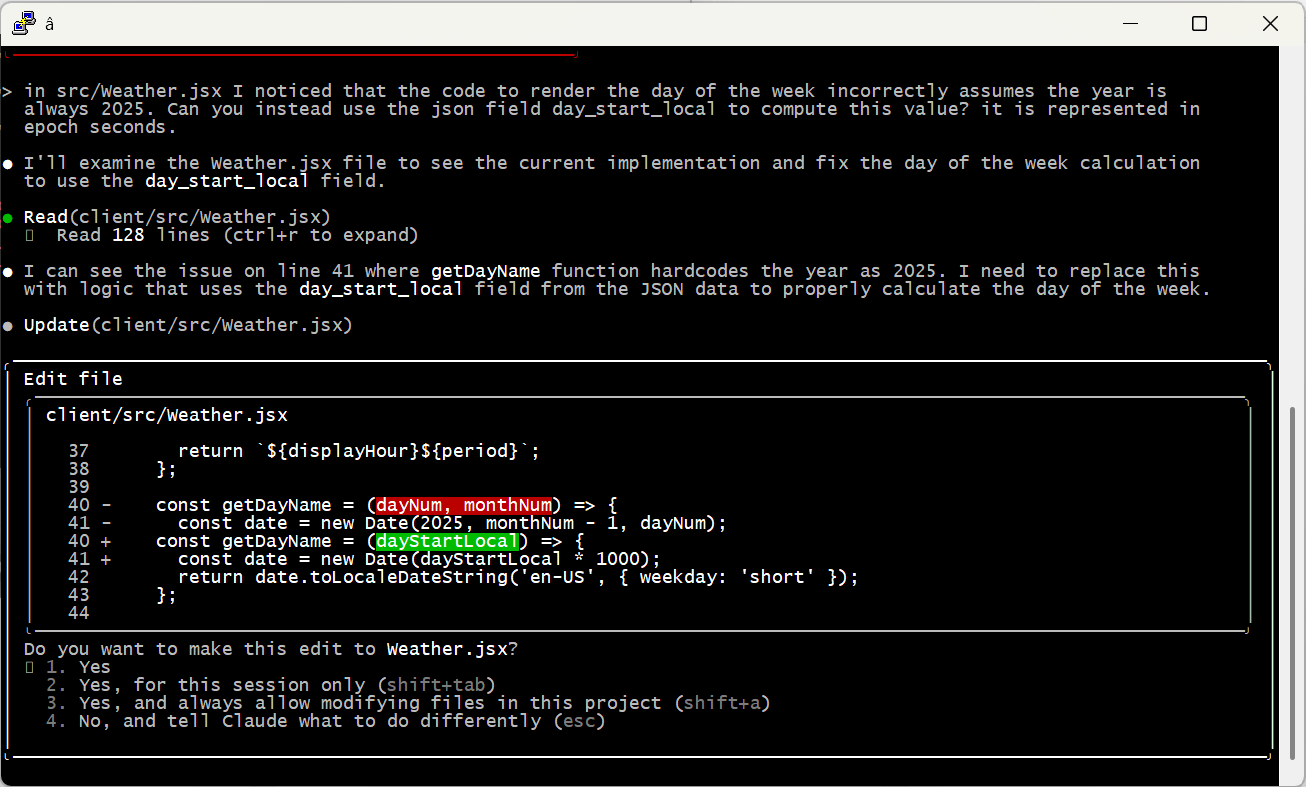
And of course, check the work yourself! Even the most senior human developers get a review before sending code to production; it’s no different with AI. When I asked Claude to code up the weather display, it created a bug by assuming it would always be 2025 — an issue that would have been invisible (for a few months at least) without manual review.
Embrace the Conversation
I find it most effective to simply talk to AI like I’d speak to a human. Set up tasks with details, examples and boundaries — just enough precision to minimize ambiguity while allowing space for learning, initiative and creativity.
I also simply cannot help but add “please” and “thank you” and “great job” and “my bad” into the conversation. That may seem a bit weird, but the agent is doing work for me, and I appreciate it, so why not acknowledge it? I actually think it leads to better outcomes, too. Maybe that’s all in my head, or maybe I just give better instructions in that mode. Either way I’m sticking with it.
Modularize and Limit Complexity
Looking back at the Caen Hill problem, it’s pretty clear what went wrong. Claude found that Denzies was a good stopping point based on distance and had great moorage, hotels and restaurants. On another thread it remembered that we were narrowboat beginners and should avoid tougher sections like Caen Hill. The failure was in missing the connection between these two factors — we couldn’t both avoid the locks and stop in Denzies.
Reminding the model to pay attention to these conflicts helps a ton. But there are still practical limits on how much they can handle at one time. A few weeks ago I tried playing with this by describing a relatively complex app. I purposely tried to do it all in one shot, something that is not recommended by anyone. 😉 The spec is here if you’d like to take a look.
As predicted, it was an abject failure. The model tried to break the problem up into pieces, but it was fundamentally unable to satisfy all the constraints at once. It would ignore requirements and lie about it, then break other stuff when it was caught out … just a mess.
At the end of the day, models can become overwhelmed — just like people. I’m sure the state of the art will keep evolving (“agentic” AI may be one step on that path), but for now the onus is still on humans to organize problems into tasks the machines can do.
A Miraculous World
I think that’s enough for one post. I just can’t encourage folks enough to spend time with these models and get a real, hands-on, hype-free sense of how they work, their strengths and their weaknesses. Don’t get sucked into the simplistic narratives of the popular press; on both “sides” of the AI issue they’re more about fitting the technology to their ideology than real understanding.
The reality is amazing and beautiful. And scary. And it’s here.
Back in 1987, Dartmouth required each incoming freshman to have a Macintosh computer. This was unheard of at the time — the whole campus (including dorm rooms) had network taps, there was a huge bank of laser printers you could use for free, the school had its own email system, and live chat wasn’t just a curiosity. It was awesome.
When I met my partner of now 30+ years, she was working at the campus computer store, and one of her jobs was to help people buy and install additional memory for their machines. This was a laughably complex job including, amongst other things, knowing that:
You had to install chips in a specific order in specific unlabeled slots;
You usually couldn’t just add one chip, you had to add them in pairs;
Depending on the computer, you might have to cut (yes physically cut) resistor leads on the motherboard. Or if you were lucky, flip some tiny barely-labeled jumper switches;
I mean seriously, don’t miss this page-turner from Apple circa 1992. And that was just the user-level stuff — developers were presented with tedious and finicky concepts like “handles” that enabled the system to optimize its tiny memory space.
Jump to today and barely anybody thinks about RAM. Processors typically use 64 bits to store memory locations, which is basically infinite. Virtual memory swaps still happen, but they’re invisible and handle-type bugs are gone. I can’t even remember the last time I cracked open a laptop case.
Anyhoo, my point here is that there was a time when we knew the state-of-the-art wasn’t good enough, but we didn’t have a great answer to the problem. Creative solutions were ridiculous on their face — once again I refer you to this documentation — but people kept feeling their way around, trying to make progress. And eventually, they did. All the inelegant and inconvenient hacks were replaced by something simple and qualitatively, not just quantitatively, better.
Frozen in Time
Today, large AI (ok, LLM) models have a problem that’s eerily similar to our late twentieth-century RAM circus. And it also involves memory, albeit in a different way. Trained AI models are frozen in time — once formal training stops, they stop learning (basically) forever. Each session is like 50 First Dates, where Lucy starts the morning oblivious to what happened the day before.
Training takes zillions of iterations — lots of time and lots of electricity and lots of money. But it turns out that, once a model is trained, asking questions is pretty darn efficient. You’re no longer adjusting the weights, you’re just providing inputs, doing a round of computation and spitting out results.
TLDR — the models that we use every day are the static result of extended training. They do not continue to learn anything new (except when their owners explicitly re-train). This is why early models might tell you that Biden is president — because he was, when the model was trained. Time (and learning) stops when training is complete.
Not Like Us
Now, I’ve been outspoken about this — I think LLMs are almost certainly sentient, at least to any degree and definition that matters. I get particularly annoyed when people say “but they don’t have a soul or feelings” or whatever, because nobody can tell me what those things actually are. We’re modeling human brains, and they act like human brains, so why are we so convinced we’re special?
But at least in one way, there is an answer to that question. Today’s AI models don’t continue to learn as they exist — they’re static. Even today at the ripe old age of 56, when I get enough positive or negative feedback, I learn — e.g., don’t keep trying to charge your Rivian when the battery is overheating.
This is a core property of every living creature with a brain. We’re constantly learning, from before we’re even born until the day we die. Memories are physically stamped into our biology; synapses grow and change and wither as we experience the real world. It’s just amazing and wonderful and insane. And it’s why we can survive in a changing world for almost 100 years before checking out.
But today’s models can’t do this. And so, we hack. Just like in those early RAM days, folks are inventing workarounds for the static model problem at an incredible pace, and many/most of these attempts are kind of silly when you step back. But for now, we are where we are — so let’s dig in a bit.
Back to School: Fine Tuning
Fine tuning just means “more training” — effective for teaching a model about some specific domain or set of concepts that weren’t part of its initial run. Maybe you have a proprietary customer support database, or you want to get really good at interpreting specific medical images.
The process can be as simple as picking up where the initial training stopped— more data, more feedback, off we go. But of course it’s expensive to do this, and there’s actually a risk of something called “catastrophic forgetting,” where previously-solid knowledge is lost due to new experience.
More commonly, fine-tuning involves tweaking around the edges. For example, you might alter the weights of only the uppermost layers of the network, which tend to be less foundational. For example, lower level image processing may detect edges and shapes, while upper levels translate those primitives into complex figures like tumors or lesions.
Folks have also been experimenting with crazy math-heavy solutions like low-rank adaptation that using smaller parameter sets to impact the overall model. Don’t ask me how this really works. Math is hard; let’s go shopping.
In any case, none of this changes the fundamental situation — after fine-tuning, the model is still static. But it does provide an avenue to integrate new knowledge and help models grow over time. So that’s cool.
Retrieval-Augmented Generation
Another way of providing new data or concepts to a model is Retrieval-Augmented Generation (“RAG” — these folks love their acronyms). In this approach, models are provided the ability to fetch external data when needed.
The typical way “normal” folks encounter RAG is when asking about current events or topics that require context, like this (see the full exchange here or here):
I use Anthropic Claude for most of my AI experiments these days and have allowed it access to web searches. In this conversation you see the model looking for current and historic information about wildfires near Ventura, then drawing conclusions based on what it finds.
Model Context Protocol, Take 1
These days most RAG tools are implemented using Model Context Protocol, an emerging standard for extending AI models. MCP is a lot more than RAG and we’ll talk about that later, but in its simplest form it just provides a consistent way for models to find external information.
What’s really interesting here is that the models themselves decide when they need to look for new data. This is seriously trippy, cool and more than a bit freaky. As a quick demonstration, I MCP-enabled the data behind the water tank that serves our little community on Whidbey Island.
I’ve implemented the protocol from scratch in Java using JsonRpc2 and Azure Functions. I could go on for a long time about how MCP is bat-sh*t insane and sloppy and incredibly poorly-conceived — but I will limit myself to comparing it to those early Macintosh RAM days. Eventually we’ll get to something more elegant. I hope.
Anyways, MCP tools of this variety (“remote servers”) are configured by providing the model with a URL that implements the protocol (in my case, this one). The model interrogates the tool for its capabilities, which are largely expressed with plain-English prose. The full Water Tank description is here; this is the key part:
Returns JSON data representing historical and current water levels in the Witter Beach (Langley, Washington, USA) community water tank. Measurements are recorded every 10 minutes unless there is a problem with network connectivity. The tank holds a maximum of 2,000 gallons and values are reported in centimeters of height of water in the tank. Each 3.4 inches of height represents about 100 gallons of water in the tank. Parameters can be used to customize results; if none are provided the tool will return the most recent 7 days of data with timestamps in the US Pacific time zone.
Other fields explain how to use query parameters. For example, “The number of days to return data for (default 7)” or “The timezone for results (default PST8PDT). This value is parsed by the Java statement ZoneId.of(zone).” Based on all this text, the model infers when it needs to use the tool to answer a question, like this:
*** IMPORANT ASIDE *** If you look closely, you’ll notice that the model seriously screwed up its calculation, claiming a current tank volume of 4,900 gallons, when its maximum capacity is actually 2,000. If you click the link to the full exchange, you’ll see me call it out, and it corrects itself. This kind of thing happens with some regularity across the AI landscape — it’s important to be vigilant and not be lulled into assumptions of infallibility!
This is an amazing sequence of events:
The model realized that it did not have sufficient information to answer my question.
It inferred (from a prose description) that the Witter MCP tool might have useful data.
It fetched and analyzed that data automatically.
It responded intelligently and usefully (even with the math error, the overall answer to my question was correct). Pretty cool.
Large Context: Windows
Folks are also trying to help models learn by providing extra input in real time, with each interaction. For example, when I ask Claude “How would you respond when a golfer always seems to hit their ball into sand traps?” I get a useful but clinical and mechanical set of tips (see here or here). But if I provide more context and a bunch of examples, I can teach the model to be more encouraging and understanding of the frustrations all new golfers experience:
Now, providing this kind of context (known as multi-shot prompting) every single time is obviously stupid. But, for now, it gets the job done.
Early models had small context windows — they just couldn’t handle enough simultaneous input to use a technique like this (ok my little contrived example would have been fine, but real-world usage was too much). But these days context windows are enormous (Claude is currently in the middle of the pack with a 200,000 token window, where each English word corresponds to roughly 1.5 tokens).
Large Context: History
Say we’re at the market and they have a sale on bananas. You ask me if I like them, and I say no, they are gross (because they are). When we move to the bakery, you’re not likely to ask if I want banana muffins, because you remember our earlier interaction.
As we know, AI models can’t do this — but they can simulate it, at least for sessions of limited duration (like a tech support chat). We simply provide the entire chat history every time, like this:
Models are fast enough, and have large enough context windows, that we can do this for quite a long chat before the cost really kills us.
But eventually it does — and so we keep hacking. One technique is to ask the model itself to summarize the chat so far, and then use that (presumably much shorter) summary as input to the next exchange. If the model does a good job of including important ideas (like my distaste for bananas) in the summary, the effect is almost as good as using the full text.
Even this has limits. When the session is over, the model snaps right back to it’s statically-trained self. At least Lucy had that VCR tape to help her catch up.
Model Context Protocol, Take 2
We’ve already seen how MCP helps connect models with external data. But the protocol is more than that, in at least two important ways:
First, MCP enables models to take action in the real world. Today these actions are pretty tame — setting up online meetings or updating a Github repository — but it’s only a matter of time before models are making serious decisions up to and including military action. That’s far beyond our topic for today, but don’t think for a moment it’s not part of our future.
Second and more relevant to this post, MCP is intended to augment the innate capabilities of the model itself — we’re already seeing MCP tools that increase memory capacity beyond internal context windows.
MCP is stateful and two-way. The model asks questions of the MCP server, which can turn around and ask questions of the model to clarify or otherwise improve its own response. We’ve never been so close to true collaboration between intelligent machines. It’s just, for now, an ugly bear of spaghetti mess to get working.
What an amazing, scary, privileged thing to being living through the birth of artificial sentience. But as always, it’s the details that make the difference, and we’re in the infancy of that work. Impressive as they are, our models are static and limited — so we hack and experiment and thrash, trying to figure out where the elegant solutions lie. We’ll get there; the seeds are somewhere in the chaos of fine tuning, context windows, RAG and MCP.
Until next time, I highly recommend you check out Lucy’s story — it’s fantastic.