



Way back in 1992, my first task as a new full-time Microsoft hire was to implement language-aware sorting in Works for DOS. It was a great introduction to professional software development at a time when we really had to care about memory and speed and the tradeoffs between them. That doesn’t happen much anymore, but it’s super-fun when it does.
Some ancient history
The earliest personal computers mostly relied on the ASCII standard, which uses seven bits to represent essentially the keys on a typewriter, plus a few “control” characters that encode newlines, tabs, stuff like that. A handy thing about ASCII is that the letters are in numerical order, so you can use simple math to sort things. For example, lowercase “a” through “z” are represented by the numbers 97-122 — bigger numbers sort after smaller ones.
Pretty quickly though, folks remembered that languages beyond English exist, and most of them need different or at least additional characters — e.g., the accented vowels in French, or completely distinct glyphs in Cyrillic. The good news was, most of our computers stored data in eight-bit units. Since ASCII only used seven bits, we could use that leftover bit to squish in another 128 characters. Woot!


Well, sort of woot. First of all, while the ISO-8859-1 standard managed to include most extended Latin characters, there wasn’t enough space to hold all the glyphs in the world. Instead you had to set up your computer with a specific “codepage” designed for your language of choice, and documents created in codepage X could look like gibberish when rendered by a computer running codepage Y. And don’t even get me started on double-byte encodings (the genesis of the once-ubiquitous “Kanji backspace” interview question).
Even worse for 1992 Sean, the letters in the upper ranges of these codepages were decidedly NOT in numerical sort order. My job was to create the smallest possible data structure that would enable Works to sort correctly and quickly using any supported codepage.
The specific implementation I created wasn’t actually that interesting — just a two-shot algorithm that used math for the lower register and a set of super-compressed lookup tables for the upper. What was memorable was how hard I worked to squeeze and shift and mask and torture that lookup data into the tiniest footprint possible.
And it really mattered! In those days the code for Works couldn’t all fit into memory at once. The program shipped on a set of about six or so floppy disks, and a dynamic loader would prompt the user to swap the disks in and out during execution. The more space your feature took up, the more swapping was required. And users hated those interruptions, so we tried really hard to avoid them.
Thanks to the exponential growth of cheap memory and CPU power, issues like this just don’t come up very much anymore. Characters generally take up sixteen big fat bits and nobody even blinks. The horror!
Developers of a certain age (ok, my age) (ok, me) love to talk about how kids today don’t really code, they just search Google for pre-built libraries and slap them together with a bit of Javascript glue. Of course that’s not true — today’s coding problems aren’t easier, they’re just different. But it does feel like we’re losing a bit of the craft of it all, so it’s rewarding when a problem comes along that demands some old school chops. That happened to me the other day, and it was indeed super-fun.
Back to the immune system
My last job before retiring was at Adaptive Biotechnologies, which uses next-generation sequencing to understand what’s going on with the adaptive immune system. The most immediate clinical use of the technology detects early recurrence (MRD) in blood cancers. Dr. Lanny Kirsch is “the guy” at Adaptive (and frankly the world) when it comes to deciphering complicated MRD results — my favorite Adaptive memories are of working with Lanny to help him dig into the biology of it all.
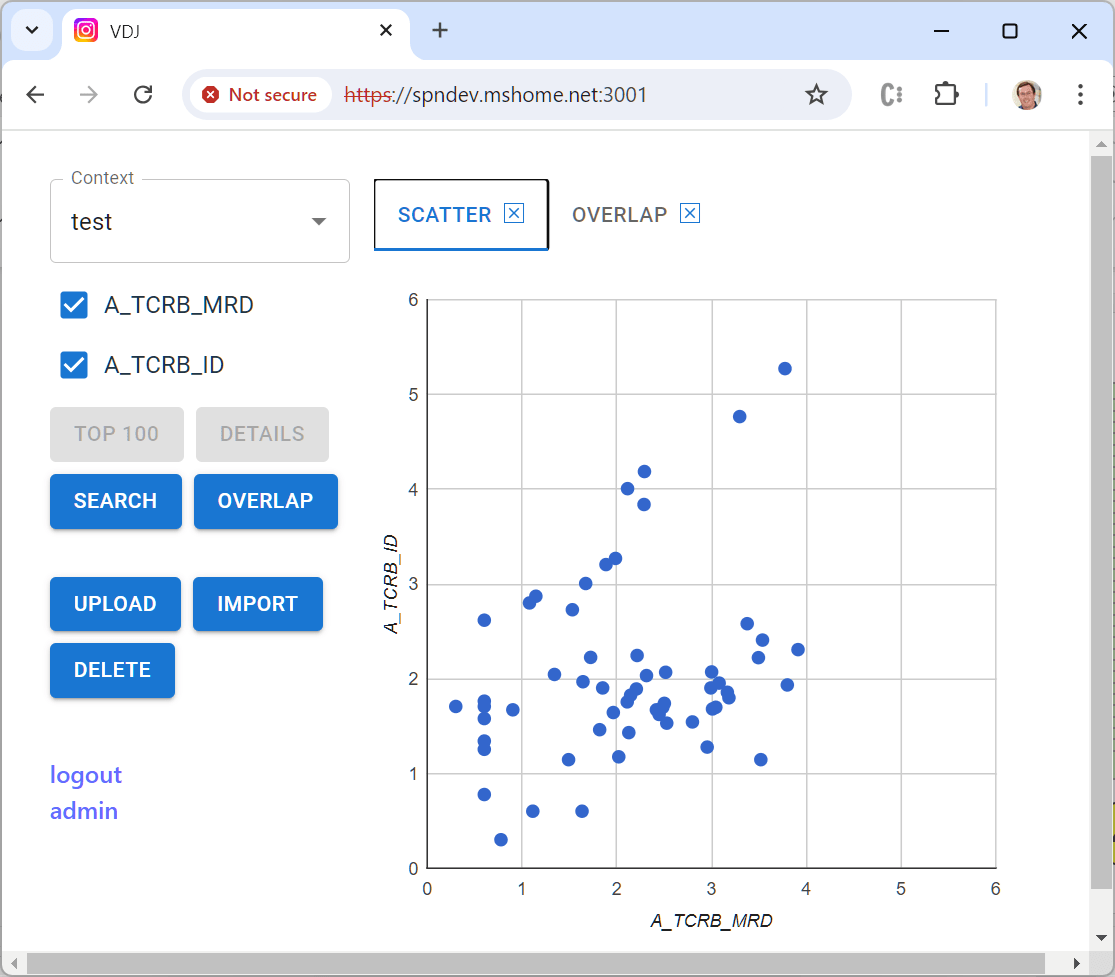
Anyway, even back when I was CTO, Lanny was asking for a visualization tool to help him examine cases. We never got it done then, and a few weeks ago he emailed me “just saying” that it still would sure be helpful. Since (a) I like writing code, and (b) I like Lanny, I decided to give it a shot. The result is an open source tool that I’m hopeful will be useful not just for Lanny, but for anyone in the small but mighty community that works with Adaptive data.
Adaptive’s test creates a laundry list of all of the unique T- or B-cell receptor sequences in a sample of blood or bone marrow. In blood cancers, one of these cells begins to multiply out of control. Post-treatment, detecting even one of these cells can be clinically relevant. Adaptive routinely reports out millions of unique sequences, and with a bunch of metadata per sequence the output files can get pretty huge. Not “LLM” huge, but big enough that working with them in memory gets challenging really quick.
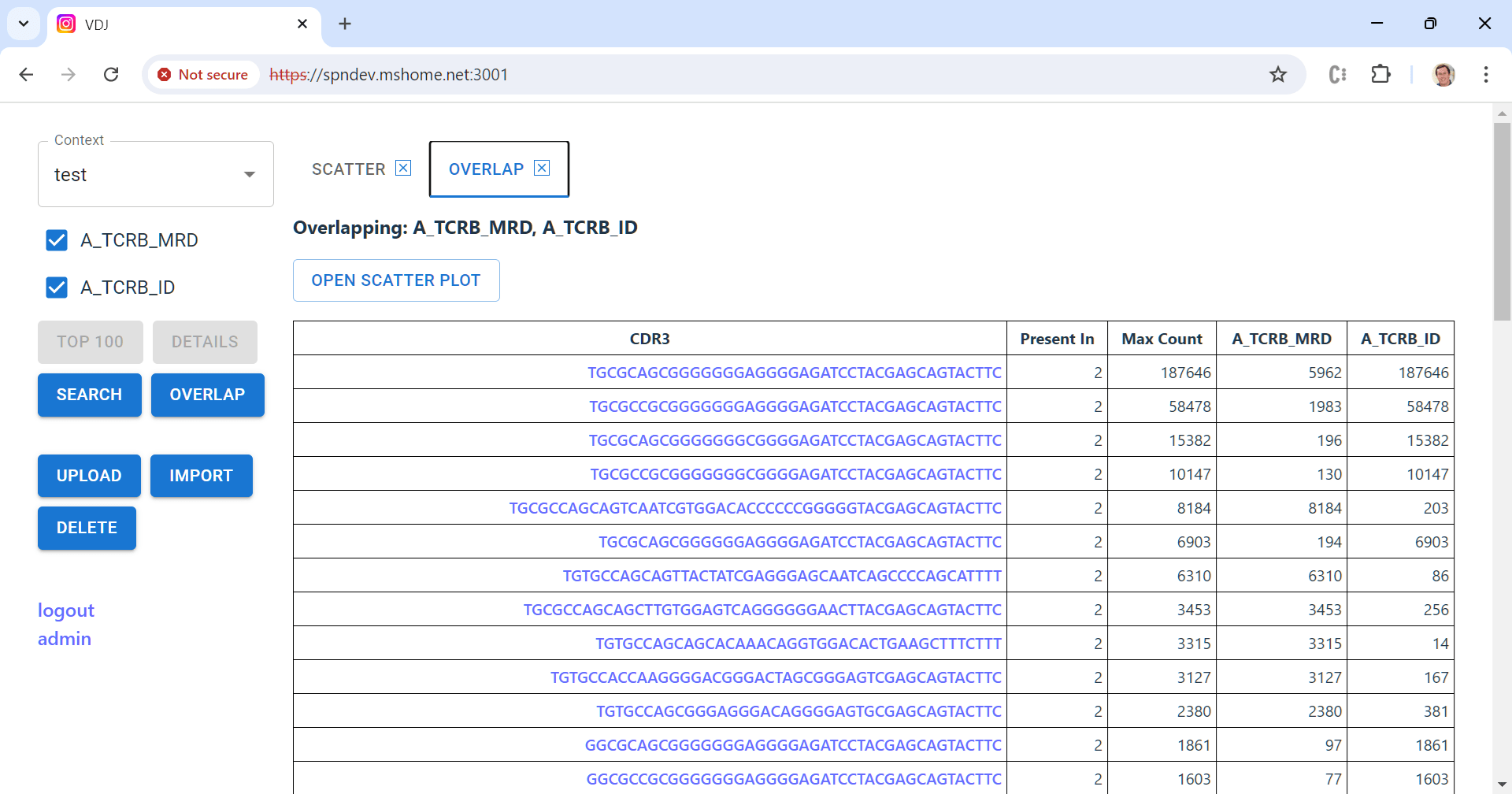
A key feature of the tool is to compute the “overlap” between a set of samples from the same patient — which sequences appear in more than one sample, and at what frequency. This is a challenging computation to do efficiently because you have to compare every sequence in every sample. The best way uses two steps: (1) sort the sequences in each sample, then (2) compare them in order starting from the front. That part of the code is here.
Sorting again!
Of course, this only works if you can sort the sequences in the first place! Not a problem, you say — every modern environment provides built-in, well-optimized sort routines. In some ways these are so convenient they make my teeth itch — one innocent-looking line of streaming sort code can hide wicked performance issues (sorry, old guy again).
But itchy teeth aside, this usually is the best first thought. Sorting in memory is simple, and given the crazy-low cost of RAM, even for really big files it can make perfect sense to just super-size the environment and get ‘er done. But not always. First, in a cloud environment like AWS or Azure, RAM costs aren’t actually crazy-low at all. A 2 CPU / 1GB RAM VM at Azure today runs about $8 per month, while a 32 CPU / 128GB RAM VM is $972! Of course you’re paying for both CPUs and RAM here, so it’s not a perfect comparison, but still, that’s real money. Yeesh.
“Just go bigger” also breaks down in multi-user environments — it may be OK to hog a few gigabytes of RAM for a single sort operation, but multiple concurrent users, all using big memory at the same time, can easily break the bank.
External Merge Sort
All of which — finally — brings me to the punchline for today: external merge sort. This approach caps memory use by leveraging secondary storage for interim results. Only sequential reads and writes to secondary storage are used, so it’s well-suited for spinning disks where seek time matters a lot. We don’t need it very often, but when we do it’s definitely all that. The algorithm works like this:


- A fixed-size “chunk” of the input file is read into memory. The data in the chunk are sorted using built-in methods, then written to a temporary disk file. This process is repeated until the entire input file has been chunked, internally sorted and written out. Because there’s never more than one chunk active at a time, its configured size defines the high-water mark of memory usage.
- Each pair of temporary files is merged together and written into a new combined temporary file. Because each input is already sorted, this operation requires basically no memory at all; individual entries can be streamed directly from the two inputs into the combined file.
- This pairwise-merge process is repeated, using the new combined files as inputs, until only one file remains — the final, fully-sorted result.
There are a few external libraries that implement external merge sort, but the grand-daddy of them all is the GNU sort tool written in 1988 by Mike Haertel and Paul Eggert.
Knobs and dials
There are a few ways we can tweak things to optimize performance in specific scenarios. First and most relevant in the modern world, we can pick a pretty big chunk size. Big enough and some inputs may completely fit in a single chunk — in which case, we can do the whole sort in memory after all!
This turns out to be a really important lesson for contemporary environments: use what you’ve got. It’s a perfect combination for the Adaptive case, where for reasons of cost and biology input size can vary dramatically.
You can also choose to merge more than two temporary files at a time (in fact, you can see this in the overlap code I mentioned earlier). Each merge step re-reads and re-writes data elements, so a larger number here can make a lot of sense.
Because each merge step is completely isolated from the others, the algorithm is also well-suited to multithreading. In my version, each pairwise merge runs in its own worker thread.
Steal this code: LineSorter.java
Note: the rest of this article is just a description of my EMS implementation, useful for working with the code but boring otherwise. Feel free to bail out if that’s not your thing — I hope the first half was worth your time!
I’m fond of the external merge sort implementation I wrote for the Adaptive visualization tool (KeySorter.java). But it makes some assumptions that aren’t particularly reusable, so for the purposes of this article, I rejiggered things a bit as LineSorter.java in the ShutdownHook Toolbox.
Other than a few references to the “Easy” utility class (“easily” removed, ha), you should be able to take this file as-is and drop it into your projects. Or you can just build it as part of the toolbox (you’ll need git and mvn and a semi-recent JDK):
git clone https://github.com/seanno/shutdownhook
cd shutdownhook/toolbox
mvn clean package
java -cp target/toolbox-1.0-SNAPSHOT.jar \
    com.shutdownhook.toolbox.LineSorter \
    -s: -c0 -o0 < /etc/passwd
(That last command is just an example that returns a sorted list of all the usernames in your /etc/passwd file. “-s:” tells it to use a colon as field separator, and “-c0 -o0” tells it to sort and output the first field of each line. Use “-?” to see a full list of options in the entrypoint, which includes an option to experiment with chunk size.)
Interfaces make it usable
LineSorter, as you might gues from the name, sorts line-based input. The class uses three interface implementations to work with the contents of each line:
LineParserbreaks each line into two strings: a “Key” (the content used for sorting) and “Output” (the content that will be written to the final output file).IdentityLineParsersimply uses the input line as both Key and Output.XsvLineParserparses fields separated by a comma, tab or other character and extracts specific fields for use as Key and Output.
SortItemandSortItemFactoryare used to compare Keys against one another.IdentitySortItem[Factory]sorts using the entire input line as-is.StringSortItem[Factory]also implements a string sort, but with a Key distinct from the original input (e.g., a field extracted withXsvLineParser).LongSortItemFactoryapplies numeric sorting rules to a Key (using a genericTypedSortItem<T>that can be applied to any type that implementsComparable).
Most typical use cases should be covered by these concrete implementations, but of course you’re free to provide your own LineParser and/or SortItem[Factory] as needed.
More parameters
In addition to these interfaces, LineSorter takes a few other parameters:
- An
ExecutorServicethat supplies worker theads; take a look here for a simple example that just creates and caches threads as necessary. HasHeaderRowindicates whether the first line of the input should be treated as headers rather than data.ReverseSortdoes the obvious. 😉LinesPerChunktunes how big each chunk should be — the default is 500,000 lines which honestly means most files will sort in memory anyways. Match to your environment.KeySeparatorandCommentCharprobably don’t need to be changed, but they’re there just in case!
Asynchronicity
The class offers both asynchronous and synchronous versions of the public interfaces:
I have a love/hate relationship with async code — it’s often a must-have to keep things running smoothly, especially for IO-bound operations. But it also can make code really messy, really fast. I try to compromise using function pairs like these. The first is a purely synchronous version – straight up logic, do your job cleanly and well. The second wraps up the first in a CompletableFuture and handles the noise that comes along with that. Actually, the async versions are pretty much boilerplate; maybe I’ll build an interface tht cleans up the copy/paste code. Another task for the queue!
Anyway, I guess that’s it for today — the rest of the implementation is (hopefully) pretty self-explanatory. I really do enjoy writing little bite-sized bits of useful code — once a nerd, always a nerd. Until next time!
Oh wait, one more bit of sorting trivia because I just don’t know how to stop. It turns out that Java’s generic List sort implementation is based on TimSort, a merge sort that takes advantage of existing runs of sorted data in the input (a common real-world occurrence). So if our data is mostly sorted AND fits into a single chunk, our sort will be lightning-fast. You can apply this approach to the initial chunking step of EMS as well, but avoiding the degenerate case gets a bit complicated. OK, that’s really the end this time.